Write a review
Compare
Key specs
  • Pen tablet Type
  • 8 Number of tablet buttons better than 68%
  • 254 × 158.8 mm² Active drawing area better than 44%
  • 495 g Weight better than 70%
Add to comparison

About the model

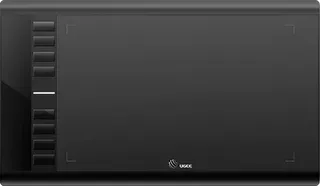
The Ugee M908 is a pen tablet released in 2023: a flat surface you draw on with a stylus while marks appear on screen.

Its pen reads 16,384 pressure levels, so lines thicken as you press harder, and it senses tilt for angled strokes. The surface resolves 5,080 LPI for fine detail. Eight tablet buttons and one on the pen hold shortcuts.

It measures 330 mm by 210 mm, is 9.3 mm thick and weighs 495 g. It works with Chromebook, Windows and Mac, and suits illustration or photo retouching.

Overview

Pen
Connectivity
General info
Why Ugee M908 is better than average
  • Weight
    495 g
    better than 70%
  • Thickness
    9.3 mm
    better than 81%
  • Pen pressure levels
    16,384
    better than 94%
  • Release date
    31 Aug 2023
    better than 83%
All specifications

Ugee M908 prices

Prices are updated daily and may differ from the shop. We may earn a commission from purchases.

General info

Specifications
Type
Pen tablet
Compatibility
Mac, Windows, Chromebook
Number of tablet buttons
8
Wireless
No
Release date
31 Aug 2023
3.5mm audio jack
No
Fold-out legs
No
Pen stand
No
Detachable cable
No
Weight
495 g
Width
330.1 mm
Thickness
9.3 mm
Height
210.1 mm
Travel bag included
No
Number of microphones
0
Active drawing area
254 × 158.8 mm²
Volume
645 cm³
Stylus included
Yes

Pen

Specifications
Pen pressure levels
16,384
Pen resolution
5080 LPI
Pen tilt sensitivity
Yes
Number of pen buttons
1
Pen tilt degrees
60°

Connectivity

Specifications
Bluetooth
No

Owner reviews

Share your experience with Ugee M908! It takes a couple of minutes and helps others choose.
Reviews (3)
  • Thomas B.
    10/10
    10/10
    • Value for money: 10/10
    • Ease of use: 10/10
    • Performance: 10/10
    • Reliability: 9/10
    • Build quality: 9/10
    You can really feel those 16384 levels
    I wanted a screenless tablet to work on my Windows laptop, and after checking out the Cintiq Pro 27 and Kamvas Pro 24, their prices quickly sent me looking elsewhere. That's how I ended up with the M908, for its 16384 pressure levels, 5080 LPI and tilt. Four months in, tilt works perfectly in Krita and Photoshop, and my hatching finally looks like hatching instead of a gray blob. All 8 buttons are mapped (undo, zoom, brush size, canvas rotation), so I barely reach for the keyboard anymore. At 9.3 mm thick and 495 g, I honestly forget it's on the desk, and it doesn't slide a millimeter even when I press down. The only thing is the single button on the stylus: I put erase on a keyboard key and that was that. At this price, I don't see what would justify paying three or four times more.
    Pros
    • tilt is really precise
    • 8 buttons in good spots
    • stays put on the desk
    • unbeatable value for money
    Cons
    • only one button on the stylus
  • Calebe Nascimento
    8/10
    8/10
    • Value for money: 8/10
    • Ease of use: 8/10
    • Performance: 9/10
    • Reliability: 7/10
    • Build quality: 8/10
    Good tablet, but the pen's single button is a daily drag
    I spent about two weeks comparing before I made the purchase. The spec sheet is what settled it for me: 16384 pressure levels, 5080 LPI, tilt sensitivity and 8 shortcut keys in a 9.3 mm body. Everyone compares the M908 with the XP-Pen Artist Ultra 16, the Kamvas Pro 24 or the Cintiq Pro 27, but those three have screens and cost several times more, and I already work with two monitors here. Paying for a display I wasn't going to use made no sense for my workflow. I use it on Windows 11 with Krita and Clip Studio; the 330 x 210 mm body sits firm in front of the keyboard, and the 495 g help, so it doesn't move even when I rest my wrist. The 16384 levels look like an ad number, but in practice what changes is control at the start and end of the stroke, and I can make a 2 or 3 px line with a texture brush without the stroke breaking in the middle. Tilt works well for shading, and I mapped the 8 keys to undo, zoom, brush size, screen rotation and layer switching, so I hardly go back to the keyboard. What bothers me is that the pen has only one button: eraser and right-click don't fit together, so I had to put the eraser on a tablet key. The driver also asked for a reinstall once after a big Windows update, and I lost about twenty minutes. Beyond that, for someone drawing on a monitor who doesn't want to pay for a display, it's a very rational choice
    Pros
    • 16384 levels with real control on fine strokes
    • 8 configurable keys that cover almost everything
    • 9.3 mm and 495 g, stays firm and doesn't slip
    • runs on Windows, Mac and Chromebook
    Cons
    • only one button on the pen
    • driver needed a reinstall after a Windows update
  • roksana1997
    4.5/10
    4.5/10
    • Value for money: 4/10
    • Ease of use: 4/10
    • Performance: 5/10
    • Reliability: 5/10
    • Build quality: 5/10
    Mixed feelings
    On the plus side there are 8 keys and 16384 pressure levels, on the minus side just one button on the pen and 495 g that you can feel after a few hours :D
    Pros
    • 8 keys
    • 16384 pressure levels
    Cons
    • one button on the pen
    • 495 g

More in Smartphones & tablets