Razer Kiyo
4.6
Webcams

Razer Kiyo

Write a review
Compare
Imaging
  • Yes Indicator light
  • 81.6° Field of view better than 35%
  • 1080 × 30 fps Video recording better than 31%
  • 4 MP Megapixels (main camera) better than 28%
Add to comparison

About the model

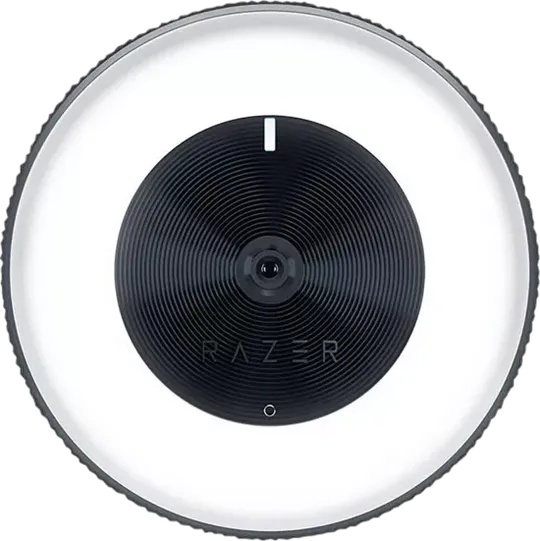
The Razer Kiyo is a webcam released in 2017. Its 4 MP sensor works with an 81.6-degree field of view, wide enough to hold you and some of the room during calls. A built-in video light brightens the face when the room is dim, and continuous autofocus keeps the image sharp as the subject moves. It has a tripod mount and a detachable 1.5 m cable, and weighs 300 g.

Overview

Audio
Design
Optics
Videography
Connectivity & Features
Why Razer Kiyo is better than average
  • Width
    69 mm
    better than 78%
All specifications

Often compared with

8.0
Compare
To favorites
9.8
Compare
To favorites
10.0
Compare
To favorites
9.3
Compare
To favorites
9.9
Compare
To favorites
6.4
Compare
To favorites
9.0
Compare
To favorites
9.4
Compare
To favorites
8.0
Compare
To favorites

Razer Kiyo prices

Prices are updated daily and may differ from the shop. We may earn a commission from purchases.

Design

Specifications
Privacy shutter
No
Indicator light
Yes
Tripod mount
Yes
Video light
Yes
Motion sensor
No
Warranty period
1 years
Thickness
47 mm
Height
69 mm
Weight
300 g
Width
69 mm

Videography

Specifications
Auto light correction
No
Continuous autofocus for movies
Yes
Field of view
81.6°
Adjustable field of view
No
HDR mode
No
Video recording
1080 × 30 fps

Optics

Specifications
Megapixels (main camera)
4 MP
Glass lens
Yes
Damage-resistant glass
No
CMOS sensor
No

Audio

Specifications
Built-in microphone
Yes
Number of microphones
1
Stereo microphone
Yes
Built-in speaker
No

Connectivity & Features

Specifications
Release date
20 Oct 2017
USB Type-C
No
Cable length
1.5 m
Detachable cable
Yes
Compatible with Android
No
Compatible with Chrome OS
No
Compatible with iOS
Yes
Compatible with Mac OS X
Yes
HDMI output
No
3.5mm audio jack
No
Is compatible with Windows
Yes

Owner reviews

Share your experience with Razer Kiyo! It takes a couple of minutes and helps others choose.
Reviews (3)
  • Авксентий
    4/10
    4/10
    • Autofocus: 4/10
    • Low-light performance: 7/10
    • Camera: 5/10
    • Build quality: 6/10
    • Video quality: 5/10
    4 MP in 2025 is no argument anymore
    Spent around two months reading reviews, comparing the numbers: 4 MP, 81.6° angle, 1080p, light ring, 300 g. Went with this instead of the Obsbot Tiny 2 because that one costs two and a half times more, and the Lenovo Go 4K Pro is plain overkill for calls, tbh. On picture: 1080p at 30 fps is the ceiling, 720p at 60 fps exists but the mush is obvious, fine for streaming, not for recording lectures. The ring is a story of its own. Twelve LEDs, no diffuser, shines straight into your face and burns glare onto glasses, I keep it at 30-40%, otherwise your face looks like a ghost's. Autofocus is contrast-based, locks in a second or two, but wave a hand and it slides off and comes back, looks dumb in Teams. One mic, enough for a call, not for voice recording, it hisses. Build is fine, the foot holds the monitor, the cable is 1.5 m and detachable but short, I had to buy an extension. Nothing fell apart in a year and a half, but asking 1080p30 for this money today is funny.
    Pros
    • The light ring genuinely rescues a dark room
    • Detachable cable and a decent monitor mount
    • Nothing broke in a year and a half
    Cons
    • 1080p only at 30 fps
    • Autofocus twitches when you move
    • Ring has no diffuser, you need to add one
    • Mic hisses when recording
    2 replies
    • marcelina92
      The autofocus thing went away for me once I set the focus by hand in Synapse. I keep the light at 25% and stuck a piece of white paper on there as a diffuser. The 1.5 m cable was too short as well, so I grabbed a USB extension and the camera hangs off the monitor arm now. On a tripod it sits steady, nothing wobbles.
    • Urishilla
      Picked mine up in 2021 and the autofocus motor started rattling after eight months, the same drift you're describing. I went to the seller first, they pushed me on to Razer support, and the whole RMA took about three weeks. Step one was a video of the fault, step two the invoice, step three they couriered out a replacement unit. That replacement has been fine for two years, so my guess is a bad first batch rather than the design. Keep the box and the bill, without those the one year warranty is basically decoration.
  • Joséphine P.
    7/10
    7/10
    • Autofocus: 6/10
    • Low-light performance: 8/10
    • Camera: 6/10
    • Build quality: 7/10
    • Video quality: 7/10
    beats the laptop cam, no argument needed
    My old setup was the built-in laptop camera, the one that hands you the face of someone who stayed till closing time, so I went through three weeks of spec sheets before landing on the Kiyo. End result: people actually recognise me on calls, and that LED ring is what rescues my 8 a.m. meetings in a studio with no windows. Only snag, at 300 g it drags the top of the screen down a little, so I parked it on a stand
    Pros
    • Adjustable light, genuinely useful in a dark room
    • Autofocus is fine for the price
    • Takes a stand, which sorts out the weight
    Cons
    • 300 g, it pulls on the screen
    • Video stuck at 1080p30
    2 replies
    • Наркис В.
      Turn off autofocus in Synapse and set it manually - I've been using it that way for a year with no jitter :D
      • Miguel Casa Grande
        Man, turning autofocus off didn't do it for me, the picture went soft whenever I moved in the chair. What worked was leaving it at 720p60 with autofocus on, feels like the sensor has more room to hunt. I teach online and have work meetings, around four hours a day, and with the ring at 20% it already handles the room. The 1.5 m cable is annoying, I bought an extender and it was fine. For anyone paying little, it's really worth it :)
  • Espartaco Ureña
    9/10
    9/10
    • Autofocus: 7/10
    • Low-light performance: 9/10
    • Camera: 8/10
    • Build quality: 8/10
    • Video quality: 8/10
    The light ring changed my streams
    Picked it up on sale at a computer shop downtown, and I haven't touched the laptop webcam since. I stream three nights a week and the built-in light ring basically rescued me, my room has no window and I used to come out grey, now you can see my whole face. The mic handles calls fine, my coworkers hear me clear and I don't have to keep the headset on anymore... The autofocus does wander when I move around a lot, one tap on the ring and it's back, no big drama either. The 1.5 m cable is short if your tower sits on the floor, but it detaches, which I appreciate when everything goes into storage. For what I paid, around 2,300 pesos, easy 9 out of 10
    Pros
    • Adjustable light ring, you really notice it in dark rooms
    • Mic is decent for meetings and calls
    • The base grips the monitor well, no slipping
    • Detachable cable, fits in the drawer
    Cons
    • Autofocus loses track if you move a lot
    • 1.5 m cable is short with the PC on the floor
    1 reply
    • James
      Can the ring light be turned off completely? I need it dark for night calls :)