7.7
Webcams

Obsbot Tiny SE

Write a review
Compare
Imaging
  • Yes Indicator light
  • 78° Field of view better than 35%
  • 1080 × 100 fps Video recording better than 99%
  • 2 MP Megapixels (main camera) better than 28%
Add to comparison

About the model

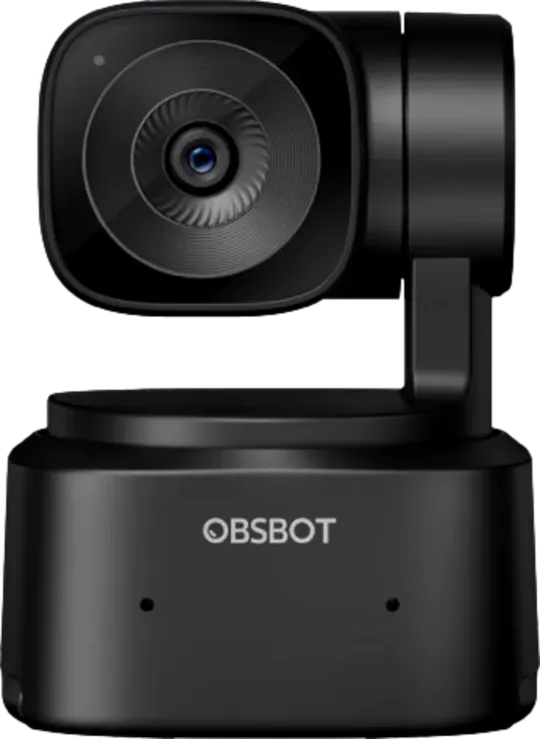
The Obsbot Tiny SE is a USB webcam released in 2025, built around a 2 MP CMOS sensor.

Its 78° field of view is adjustable, and HDR mode with auto light correction keeps the picture readable as room lighting changes. A privacy shutter covers the lens, and the noise-canceling microphone carries speech on calls.

It weighs 94 g and measures 48.37 mm across, with a tripod mount, a detachable USB Type-C cable and vertical video recording. It suits desk calls, streaming and travel.

Overview

Audio
Design
Optics
Videography
Connectivity & Features
Why Obsbot Tiny SE is better than average
  • Video recording
    1080 × 100 fps
    better than 99%
  • Release date
    9 Jan 2025
    better than 95%
  • Width
    48.37 mm
    better than 78%
All specifications

Often compared with

8.0
Compare
To favorites
9.3
Compare
To favorites
7.5
Compare
To favorites
8.6
Compare
To favorites
8.2
Compare
To favorites
8.1
Compare
To favorites
7.1
Compare
To favorites
7.8
Compare
To favorites
7.5
Compare
To favorites
6.9
Compare
To favorites

Design

Specifications
Privacy shutter
Yes
Indicator light
Yes
Tripod mount
Yes
Video light
No
Motion sensor
No
Maximum operating temperature
40 °C
Lowest potential operating temperature
0 °C
Thickness
46.46 mm
Height
64.2 mm
Weight
94 g
Width
48.37 mm

Videography

Specifications
Auto light correction
Yes
Continuous autofocus for movies
Yes
Field of view
78°
Adjustable field of view
Yes
Vertical video recording
Yes
Live streaming
Yes
HDR mode
Yes
Video recording
1080 × 100 fps

Optics

Specifications
Megapixels (main camera)
2 MP
Damage-resistant glass
No
CMOS sensor
Yes

Audio

Specifications
Noise-canceling microphone
Yes
Built-in microphone
No
Number of microphones
1
Stereo microphone
No
Built-in speaker
No

Connectivity & Features

Specifications
Release date
9 Jan 2025
USB Type-C
Yes
Detachable cable
Yes
Compatible with Android
No
Compatible with Chrome OS
No
Compatible with iOS
No
Compatible with Mac OS X
Yes
Bluetooth
No
HDMI output
No
3.5mm audio jack
No
Is compatible with Windows
Yes

Miscellaneous

Specifications
Supports a remote smartphone
No
Has a remote control
No
Wide aperture
1.8 f

Owner reviews

Share your experience with Obsbot Tiny SE! It takes a couple of minutes and helps others choose.
Reviews (4)
  • Brandon Erickson
    7/10
    7/10
    • Autofocus: 8/10
    • Low-light performance: 6/10
    • Camera: 7/10
    • Build quality: 7/10
    • Video quality: 7/10
    Upgraded from a C270, no regrets
    I used a C270 for about three years but the focus would go soft whenever I leaned back-drove me nuts. So I fell down a rabbit hole of forum threads and ended up grabbing the Tiny SE. The autofocus was the first thing I noticed: it locks onto my face and stays there instead of hunting for the wall. And the gimbal actually tracks me when I get up to scribble on the whiteboard. Weighing just 94 g with the tripod mount, it perches on my monitor shelf and I hardly notice it. The 78-degree FOV is tighter than my old webcam though, so I had to scoot it back a couple inches. The privacy shutter is a physical flip cover, and there's an indicator light that comes on with it-important since I share an office. The built-in mic is just a single one; it's okay for Discord calls but thin for anything podcast-worthy. Since it's a 2 MP sensor, you get clean 1080p but no higher resolution. The cable is USB-C and detachable, which alredy saved me once when my cat decided to attack it.
    Pros
    • Autofocus stays locked, no hunting
    • Gimbal tracking without extra software
    • Physical shutter plus indicator light
    • Detachable USB-C cable
    Cons
    • 78° FOV feels tight on a desk
    • Single mic, too thin for serious recording
    • 1080p limit, no higher resolution
  • Scott R.
    7/10
    7/10
    • Autofocus: 8/10
    • Low-light performance: 6/10
    • Camera: 7/10
    • Build quality: 7/10
    • Video quality: 7/10
    Solid for streaming
    I stream three nights a week, and the tracking acts like a second person running the camera. Tbh that’s the whole reason I ditched my old fixed 1080p cam. The HDR and auto light correction prevent my face from turning orange under the desk lamp, and the 78-degree field of view covers me plus about a chair and a half at my usual distance. I wish the sensor were more than 2 MP, but nobody in chat can spot the difference at 1080p output
    Pros
    • tracking replaces a camera operator
    • HDR tames my desk lamp
    • lightweight, mounts anywhere
    Cons
    • only a 2 MP sensor
    • single mic
  • pc
    4/10
    4/10
    • Autofocus: 8/10
    • Low-light performance: 4/10
    • Camera: 4/10
    • Build quality: 6/10
    • Video quality: 5/10
    Expected more for the money
    Upgraded from a five-year-old C920 because I wanted tracking for my online classes. The gimbal does track and the continuous autofocus holds even when I get up to write on the board; the physical privacy shutter is a plus. But it’s still a 2 MP sensor capped at 1080p, and while HDR helps with my room lighting, it can’t work miracles-once evening hits, noise creeps in. The 78-degree field of view feels too tight for my desk, I ended up pushing the camera against the wall. Single mic, and despite the noise cancellation claims my students can still hear the fan. For what I paid here in Queretaro I expected more, tbh. I returned it and went back to the C920 while I save up for something better.
    Pros
    • Gimbal and AF do their job
    • Physical privacy shutter
    • Lightweight, 94 g
    Cons
    • 2 MP sensor, maxes out at 1080p
    • Noise in low light
    • 78° FOV too narrow for my desk
    • Single microphone
  • Murilo G.
    7/10
    7/10
    • Autofocus: 8/10
    • Low-light performance: 6/10
    • Camera: 7/10
    • Build quality: 7/10
    • Video quality: 7/10
    Works on the bench
    i record bench videos for my channel, and the autofocus with the gimbal is a lifesaver when i move parts around. just wish the field of view was a bit wider to get the whole bench in frame :)
    Pros
    • continuous autofocus holds focus well
    • gimbal tracks movement smoothly
    Cons
    • 78° field of view is too narrow for my setup