4.2
Mice

HyperX Pulsefire FPS Pro

Write a review
Compare
Key specs
  • 1000 Hz Polling rate better than 54%
  • USB Connection type
  • 95 g Weight better than 33%
Add to comparison

About the model

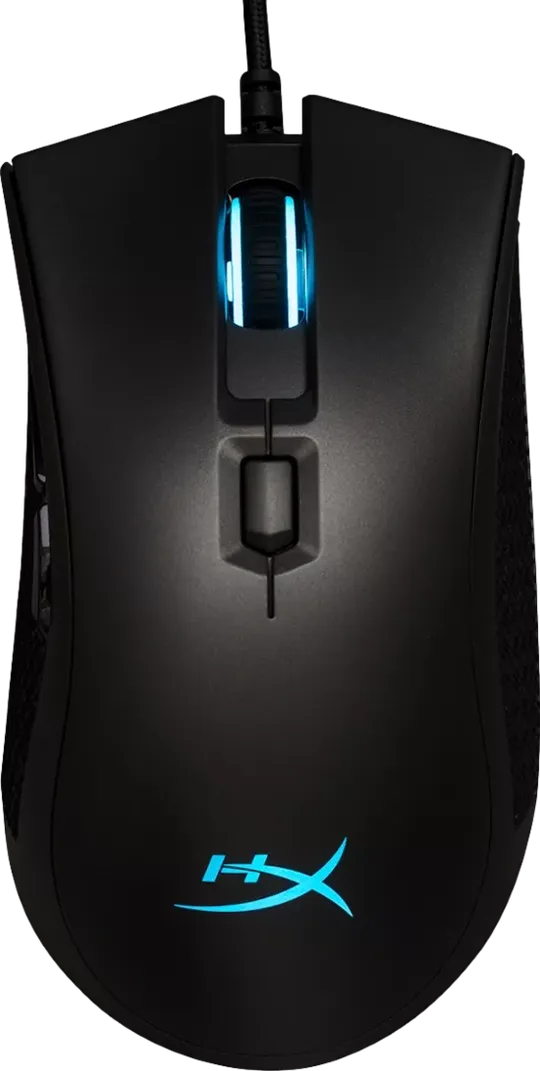
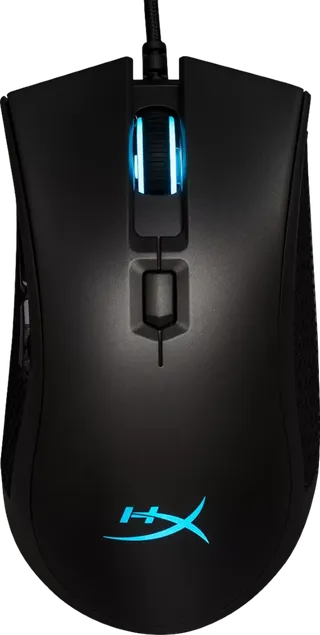
The HyperX Pulsefire FPS Pro is a wired gaming mouse with an ambidextrous shape and six programmable buttons.

Its PixArt PMW3389 sensor tracks up to 16000 DPI, 450 inches per second and 50 G of acceleration, keeping fast swipes accurate. A 1000 Hz polling rate reports position every millisecond, and a dedicated button switches DPI mid-game. Three onboard memory profiles store settings on the mouse, and RGB lighting is fitted. The 1.8 m cable reaches a rear USB port, and the body weighs 95 g.

Overview

Design
Buttons
Performance
General info
Why HyperX Pulsefire FPS Pro is better than average
  • Maximum acceleration
    50 G
    better than 70%
  • Onboard memory profiles
    3
    better than 85%
  • Minimum DPI
    100 DPI
    better than 79%
All specifications

Performance

Specifications
Polling rate
1000 Hz
Maximum speed
450 IPS
Maximum acceleration
50 G
Maximum DPI
16,000 DPI
Minimum DPI
100 DPI
Adjustable DPI
Yes

General info

Specifications
Type
Gaming
Connection type
USB
Sensor
PixArt PMW3389
Onboard memory profiles
3
Gesture support
No

Buttons

Specifications
Number of buttons
6
Number of side buttons
2
Number of programmable buttons
6
DPI switching button
Yes
Profile switching button
No

Design

Specifications
Orientation
Ambidextrous
Weight
95 g
RGB lighting
Yes
Tilting scroll wheel
No
Thumb scroll wheel
No
Tuning weights included
No
Cable length
1.8 m
Thickness
42 mm
Height
128 mm
Width
71 mm
Size class
Large

Owner reviews

Share your experience with HyperX Pulsefire FPS Pro! It takes a couple of minutes and helps others choose.
Reviews (1)
  • Ottone Tagliafierro
    9/10
    9/10
    • Value for money: 9/10
    • Ease of use: 9/10
    • Performance: 9/10
    • Reliability: 7/10
    • Build quality: 8/10
    The 3389 pulls its weight, the wheel not quite
    Grabbed it at the end of January from a MediaWorld in Milan, since the click on my old mouse kept jamming. The PMW3389 is something you actually feel: I run 800 DPI for FPS and 1600 on the desktop, and fast flicks in Apex still track clean, with the 450 IPS and 50 G of acceleration sitting there if you genuinely need them. 95 g is the right trade for me, it isn't a 60 g featherweight and it isn't a brick either, and the ambidextrous shell with both side buttons on the left only sits nicely in claw grip. What irritates me: the 1.8 m cable is stiff rubber, not paracord, so at low sensitivity you feel it dragging on the pad, and the wheel's notch is loud and after two months already has a bit of side play. I keep the RGB off; the 3 onboard profiles get plenty of use because I switch DPI with the button underneath without opening Ngenuity, which is a heavy piece of software anyway. At 40 euros the sensor is a different league from 20 euro mice, so I'd recommend it, the 9 is down to the wheel and the cable.
    Pros
    • PMW3389 sensor stays accurate even in fast flicks
    • 3 onboard profiles, no software running
    • 95 g well balanced, comfy ambidextrous shape
    • Fair price for a sensor in this class
    Cons
    • Rubber cable, stiff, not paracord
    • Loud wheel, play in it after 2 months
    • Ngenuity is heavy to keep in the background
    2 replies
    • Roger Rodrigues
      the stiff rubber cable, can you swap it for a paracord or do you have to open up the mouse? personally i've got a glass desk and i'm worried it'll snag. and the coating on the cable, does it get marked over time?
      • Ottone Tagliafierro
        On the cable I can confirm it: it can be replaced, but it isn't plug and play since it runs under the shell, so either you open the mouse or you get a bungee. Then the surface: the hard rubber glides better on a cloth pad than on wood, that I'm telling you from experience. And the coating after two months is still intact, it's just gone a bit shiny where it touches the edge of the desk.