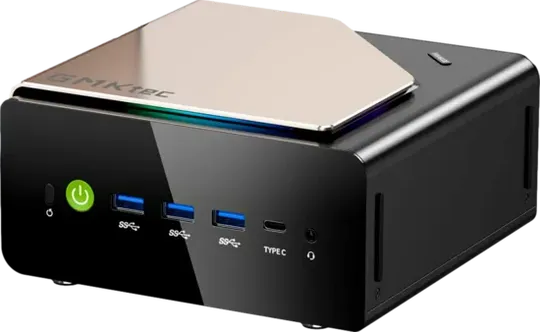
GMKtec Evo-T2
6.6
Mini PCs

GMKtec Evo-T2

Write a review
Compare
  • Faster than 77% of mini PCs
  • 122 specs
Key specs
  • 1000 GB SSD storage capacity better than 30%
  • 128 GB RAM better than 85%
  • 16 threads CPU threads better than 46%
Performance
PassMark result
37,904
PassMark result (single)
4451
All benchmarks
Add to comparison

Overview

CPU
Graphics card
Memory
Benchmarks
Connectivity
General info
Why GMKtec Evo-T2 is better than average
  • RAM
    128 GB
    better than 85%
  • USB 3.2 Gen 2 ports (USB-A)
    3
    better than 84%
  • Bluetooth version
    5.4
    better than 79%
  • PassMark result (single)
    4451
    better than 98%
  • Semiconductor size
    3 nm
    better than 83%
  • PCI Express (PCIe) version
    5
    better than 82%
  • Turbo clock speed
    5.1 GHz
    better than 82%
  • Thermal Design Power (TDP)
    25 W
    better than 82%
All specifications

Often compared with

10.0
Compare
To favorites
7.9
Compare
To favorites
8.7
Compare
To favorites
6.9
Compare
To favorites
7.9
Compare
To favorites
6.9
Compare
To favorites
7.7
Compare
To favorites
6.9
Compare
To favorites
6.8
Compare
To favorites
6.8
Compare
To favorites

GMKtec Evo-T2 prices

Prices are updated daily and may differ from the shop. We may earn a commission from purchases.

Benchmarks

Benchmark results
PassMark result
37,904
Better than 77% of the category
PassMark result (single)
4451
Better than 98% of the category

General info

Specifications
SSD storage capacity
1000 GB
Form factor
Micro-ATX
Release date
5 Feb 2026
NVMe
Yes

CPU

Specifications
Thermal Design Power (TDP)
from Intel Core Ultra X9 388H
25 W
Turbo clock speed
from Intel Core Ultra X9 388H
5.1 GHz
CPU threads
from Intel Core Ultra X9 388H
16 threads
Multithreading
from Intel Core Ultra X9 388H
Yes
Has integrated graphics
from Intel Core Ultra X9 388H
Yes
CPU speed
from Intel Core Ultra X9 388H
4 x 2.1 & 4 x 1.6 GHz

Graphics card

Specifications
GPU turbo
from Intel Core Ultra X9 388H
2500 MHz
Maximum memory bandwidth
from Intel Core Ultra X9 388H
153.6 GB/s
PCI Express (PCIe) version
from Intel Core Ultra X9 388H
5
DirectX version
from Intel Core Ultra X9 388H
DirectX 12 Ultimate
OpenGL version
from Intel Core Ultra X9 388H
4.6
OpenCL version
from Intel Core Ultra X9 388H
3
Semiconductor size
from Intel Core Ultra X9 388H
3 nm
Supported displays
from Intel Core Ultra X9 388H
4

Memory

Specifications
RAM
128 GB
DDR memory version
5

Connectivity

Specifications
Wi-Fi version
Wi-Fi 7 (802.11be), Wi-Fi 6E (802.11ax), Wi-Fi 6 (802.11ax), Wi-Fi 5 (802.11ac), Wi-Fi 4 (802.11n)
Wi-Fi connectivity
Yes
Bluetooth
Yes
Bluetooth version
5.4
USB 2.0 ports
0
USB 3.2 Gen 2 ports (USB-A)
3
USB 3.2 Gen 1 ports (USB-A)
0
USB 3.2 Gen 2 ports (USB-C)
1
USB 4 40Gbps ports
1
USB 4 20Gbps ports
0
USB 3.2 Gen 2x2 ports
0
USB 3.2 Gen 1 ports (USB-C)
0
Thunderbolt 4 ports
1
Thunderbolt 3 ports
0
DisplayPort outputs
1
HDMI ports
1
RJ45 ports
1
3.5mm audio jack
Yes
VGA connector
No
Has S/PDIF Out port
No

Benchmarks

Specifications
PassMark result
from Intel Core Ultra X9 388H
37,904
PassMark result (single)
from Intel Core Ultra X9 388H
4451
Base power draw
from Intel Core Ultra X9 388H
25 W
GPU name
from Intel Core Ultra X9 388H
Arc B390
AI accelerator performance
from Intel Core Ultra X9 388H
50 TOPS
RAM speed (max)
from Intel Core Ultra X9 388H
9,600 MHz

Other

Specifications
Maximum memory amount
128GB
Uses big.LITTLE technology
from Intel Core Ultra X9 388H
Yes
Chip construction
from Intel Core Ultra X9 388H
Single core chiplet
Type
from Intel Core Ultra X9 388H
Laptop
Uses flash storage
No
GPU execution units
from Intel Core Ultra X9 388H
12
Instruction sets
from Intel Core Ultra X9 388H
MMX, F16C +6 , FMA3, AES, AVX, AVX2, SSE 4.1, SSE 4.2
Peak power draw
from Intel Core Ultra X9 388H
80 W
Memory channels
from Intel Core Ultra X9 388H
2
Has NX bit
from Intel Core Ultra X9 388H
Yes
PCIe lanes
from Intel Core Ultra X9 388H
12
Hardware security enclave
from Intel Core Ultra X9 388H
Firmware TPM

Owner reviews

Share your experience with GMKtec Evo-T2! It takes a couple of minutes and helps others choose.
Reviews (5)
  • Гремислав Зимин
    10/10
    10/10
    • Value for money: 10/10
    • Ease of use: 9/10
    • Performance: 10/10
    • Reliability: 10/10
    • Build quality: 9/10
    128 gigs and PCIe 5.0 outweighed the ROG NUC
    Picked it strictly on the numbers: 128 GB DDR5, 153.6 GB/s and PCIe 5.0 outweighed the ROG NUC 16, which has half the memory for the same money... Half a year in: ten Docker containers, two VMs and a browser with a hundred tabs, I've seen swap exactly zero times, external NVMe over USB4 40 Gbps does its 3 GB/s, and at idle it's silence and around 40 degrees on the cores. Only had to get used to the 5.1 GHz turbo boost not holding long and the fan being audible under a long render, but I still didn't take the Beelink GTR9 Pro with 64 GB
    Pros
    • 128 GB DDR5, 153.6 GB/s
    • PCIe 5.0 and USB4 40 Gbps
    • Silent at idle
    • One 2.5G RJ45 is enough for my setup
    Cons
    • 25 W TDP, short boost
    • Fan is audible under load
    • Only one USB-C 3.2 Gen 2
  • Борислав
    8/10
    8/10
    • Value for money: 9/10
    • Ease of use: 8/10
    • Performance: 8/10
    • Reliability: 8/10
    • Build quality: 8/10
    Swapped it and the problems are gone
    the first unit never started within a week, the store replaced it without any fuss, and the second one has been running 128 gigs and three monitors for four months now without a hiccup
    Pros
    • 128 GB of memory
    • Three monitor outputs
    • Quiet in operation
    Cons
    • Gets hot under sustained load
  • Vincent F.
    9/10
    9/10
    • Value for money: 10/10
    • Ease of use: 9/10
    • Performance: 9/10
    • Reliability: 9/10
    • Build quality: 8/10
    Second unit, everything works now
    First one died after ten days, USB4 port went completely dead, shop swapped it without any hassle and since then it's night and day. 128 GB DDR5 with Thunderbolt 4 driving two 4K displays plus a dock simultaneously, I'm not going back to a tower. What bugs me is the 25 W, on a longer export the clocks drop and the fan starts singing, but honestly at this price I forgive it
    Pros
    • 128 GB DDR5 out of the box
    • TB4 + USB4 40Gbps
    • Quiet at idle
    • Wi-Fi 6E spot on
    Cons
    • 25 W, hits the ceiling fast
    • Fan audible under long load
  • Patrick H.
    3/10
    3/10
    • Value for money: 2/10
    • Ease of use: 4/10
    • Performance: 4/10
    • Reliability: 3/10
    • Build quality: 5/10
    Not for actual work
    Six weeks in and it's going back: the 25 W TDP chokes on Premiere exports, the fan whines while siting idle, and Wi-Fi 6E kept dropping down to 2.4 GHz
    Pros
    • Compact
    • 128 GB was in place on day one
    Cons
    • Throttles badly under load
    • Fan is audible at idle
    • Wi-Fi dropped bands every day
  • Philip Dean
    9.5/10
    9.5/10
    • Value for money: 9/10
    • Ease of use: 9/10
    • Performance: 10/10
    • Reliability: 10/10
    • Build quality: 9/10
    Still my main machine after eight months
    Eight months of daily use, and here's what I keep checking, in order. The 128 GB of DDR5 has never forced me to close a window. The fan only gets noticeable when Handbrake loads all 16 threads. Since week one the Thunderbolt 4 port has handled two 4K panels and a capture card. The 1 TB NVMe still shows 97% health in CrystalDiskInfo, and I haven't had a single blue screen or a Wi-Fi 6E link drop on the 6 GHz band. The one thing I'd change is the 25 W TDP, since a long compile does hit that limit and the clocks settle around 3.6 GHz after about ninety seconds.
    Pros
    • 128 GB DDR5 means nothing ever swaps
    • Both TB4 and USB4 40Gbps are onboard
    • Whisper quiet when idle
    • Wi-Fi 6E stays stable on 6 GHz
    Cons
    • 25 W cap lowers sustained clocks
    • Only a single USB-C 3.2 Gen 2