4.6
Mice

Xiaomi Gaming Mouse 2

Write a review
Compare
Key specs
  • 8000 Hz Polling rate better than 94%
  • 2.4GHz wireless, Bluetooth Connection type
  • 160 hours Battery life better than 39%
  • 58 g Weight better than 82%
Add to comparison

About the model

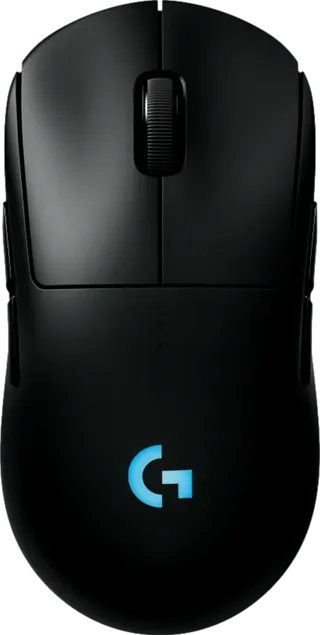
Xiaomi Gaming Mouse 2 is a right-handed gaming mouse released in 2026. Its 8000 Hz polling rate reports cursor movement to the computer 8000 times per second, so the pointer follows quick flicks with less delay.

The PixArt PAW3955XM sensor reaches 40000 DPI, with 60 G acceleration and 750 IPS speed, letting you sweep the mouse fast without the cursor losing track. At 58 g it moves easily on the pad. The rechargeable battery runs up to 160 hours and connects over 2.4 GHz or Bluetooth.

Overview

Design
Buttons
Performance
General info
Why Xiaomi Gaming Mouse 2 is better than average
  • Polling rate
    8000 Hz
    better than 94%
  • Release date
    7 May 2026
    better than 97%
  • Maximum acceleration
    60 G
    better than 96%
  • Maximum speed
    750 IPS
    better than 90%
  • Weight
    58 g
    better than 82%
  • Minimum DPI
    100 DPI
    better than 79%
  • Maximum DPI
    40,000 DPI
    better than 97%
  • Height
    111 mm
    better than 83%
All specifications

Often compared with

10.0
Compare
To favorites
9.0
Compare
To favorites
7.6
Compare
To favorites
6.7
Compare
To favorites
7.7
Compare
To favorites
7.4
Compare
To favorites
6.8
Compare
To favorites
6.5
Compare
To favorites
8.5
Compare
To favorites
8.1
Compare
To favorites

Performance

Specifications
Polling rate
8000 Hz
Maximum speed
750 IPS
Maximum acceleration
60 G
Maximum DPI
40,000 DPI
Minimum DPI
100 DPI
Adjustable DPI
Yes

General info

Specifications
Type
Gaming, Productivity
Connection type
2.4GHz wireless, Bluetooth
Sensor
PixArt PAW3955XM
Onboard memory profiles
0
Gesture support
No
Battery life
160 hours
Use while charging
No
Rechargeable battery
Yes
Warranty period
1 years
Release date
7 May 2026

Buttons

Specifications
Number of buttons
6
Number of side buttons
2
Number of programmable buttons
6
DPI switching button
Yes
Profile switching button
No

Design

Specifications
Orientation
Right-handed
Weight
58 g
RGB lighting
No
Tilting scroll wheel
No
Thumb scroll wheel
No
Tuning weights included
No
Thickness
34 mm
Height
111 mm
Width
65 mm
Size class
Medium

Owner reviews

Share your experience with Xiaomi Gaming Mouse 2! It takes a couple of minutes and helps others choose.
Reviews (6)
  • Ryan C.
    10/10
    10/10
    • Value for money: 10/10
    • Ease of use: 9/10
    • Performance: 10/10
    • Reliability: 10/10
    • Build quality: 10/10
    Not a single drop
    Two weeks at 8k polling and zero drops so far. At 58 g it practically disappears in the hand. Clicks are crisp and the side buttons land right under the thumb. Daily use has only pulled the battery down 20 percent. Came off a Basilisk and I'm not going back
    Pros
    • 8k polling is rock solid
    • 58 g
    • Battery runs forever
    Cons
    • Software is bare bones
  • Акулина М.
    9.5/10
    9.5/10
    • Value for money: 9/10
    • Ease of use: 9/10
    • Performance: 10/10
    • Reliability: 10/10
    • Build quality: 9/10
    Two weeks in and everything checks out
    Two weeks on 8000 Hz over 2.4 and not one drop, the PAW3955XM doesn't miss a flick at 750 IPS, and at 58 g my hand isn't wrecked by evening
    Pros
    • 8k with no cursor teleporting
    • 58 g, hand doesn't wear out
    Cons
    • 0 onboard profiles, all of it runs through the software
  • porfirio
    8.5/10
    8.5/10
    • Value for money: 9/10
    • Ease of use: 8/10
    • Performance: 9/10
    • Reliability: 8/10
    • Build quality: 8/10
    Went by the numbers, not the brand
    I was weighing the Basilisk V3 Pro 35K against the Naga V3 Pro, but both of them weigh close to twice as much, and I wanted something light for the desk, so I lined the spec sheets up next to each other. 58 g, PAW3955XM, 750 IPS and 60 G of acceleration are more than I need for 1440p at 165 Hz!! I take the 8000 Hz down to 4000 because in a couple of games it eats CPU and I feel no difference in tracking, and with 0 onboard memory profiles I'm stuck with the software installed on every machine. Even so, at 160 h of battery and 6 programmable buttons I found nothing else at this price :)
    Pros
    • 58 g with 750 IPS and 60 G
    • 160 h of genuine battery life on 2.4 at 1000 Hz
    • 100 DPI minimum for fine tuning
    Cons
    • No onboard profiles
    • 8000 Hz punishes the CPU in some games
  • Laura
    10/10
    10/10
    • Value for money: 10/10
    • Ease of use: 10/10
    • Performance: 10/10
    • Reliability: 9/10
    • Build quality: 9/10
    Took over from my work mouse and my wrist is thankful
    My old office mouse started double-clicking right in the middle of a spreadsheet, so I grabbed this one figguring it would be a toy. Turns out it is not a toy at all. Copy, paste and undo sit on the six buttons now and my right hand barely travels to the keyboard, which at my age is the entire point. The 2.4 dongle stays in the dock on my desk and bluetooth goes along with the laptop when I work from the kitchen, both of them pair instantly, and I have not had one dropout on Teams calls. Battery went a bit under a month of eight hour days before I plugged it in, and it charges over the same cable as my phone. The only thing that bugs me is that nothing saves on the mouse itself, so on a borrowed machine my button setup is gone until I install the software again.
    Pros
    • Six buttons I can program as shortcuts
    • 2.4G and bluetooth both painless
    • Battery close to a month of workdays
    • Light, wrist not tired by 5 pm
    Cons
    • No onboard profiles, setup lives in the app
    • Shaped for the right hand only
  • Fernando Castro
    9/10
    9/10
    • Value for money: 9/10
    • Ease of use: 10/10
    • Performance: 9/10
    • Reliability: 9/10
    • Build quality: 8/10
    Light and no dropouts
    Picked it up for weekend shooters. It surprised me. Those 58 g feel really odd for the first few matches. After that you don't want anything else. Three hours straight and my wrist doesn't complain at all - with the old mouse I'd finish in pain. The 2.4 runs smooth, no dropouts even mid-match. The Xiaomi software does take more steps than I'd like to set up the side buttons.
    Pros
    • 58 g, my wrist is grateful
    • 2.4 stays stable in long sessions
    • Battery lasts weeks
    Cons
    • Software is a bit roundabout
    • Only two side buttons
  • 雪
    5/10
    5/10
    • Value for money: 3/10
    • Ease of use: 6/10
    • Performance: 7/10
    • Reliability: 6/10
    • Build quality: 7/10
    Nice numbers, average in hand
    Three weeks in. It works. But it's not the level the internet hype promised. 40000 DPI is just stacked numbers. I keep mine at 1600. A PAW3955XM is far more than daily use needs. What I actually feel is 58 g and the no-hole shell - palm stays dry. The annoyance: 0 onboard profiles. Change computer, install the driver, set everything again. Bad for anyone running between home and office. At 8000 Hz you get nowhere near 160 hours. That number is Bluetooth at low polling. On 2.4 at full tilt I'm plugging in the cable after a bit over a week. Two side buttons only. MMO players, look elsewhere. It can't replace the twelve on a Naga V3 Pro. Warranty is 1 year, that's it. At this price AKKO Echo and ATK A9 Air are cutting each other on price. Only play FPS and want light? You can buy it. Don't expect it to do everything.
    Pros
    • 58 g and a no-hole shell, dry grip
    • Switching between 2.4G and Bluetooth is quick enough
    • Starts at 100 DPI, easy to fine-tune
    Cons
    • 0 onboard profiles, reset everything on a new machine
    • Battery falls off hard at 8000 Hz
    • 1 year warranty only