3.6
Routers

TP-Link AX3000

Write a review
Compare
Connection
  • Dual-band Wi-Fi bands
  • 2402 Mb/s Wi-Fi speed better than 42%
  • WPA3 Wi-Fi security protocols
  • Wi-Fi 6 (802.11ax), Wi-Fi 5 (802.11ac), Wi-Fi 4 (802.11n) Wi-Fi version
Add to comparison

About the model

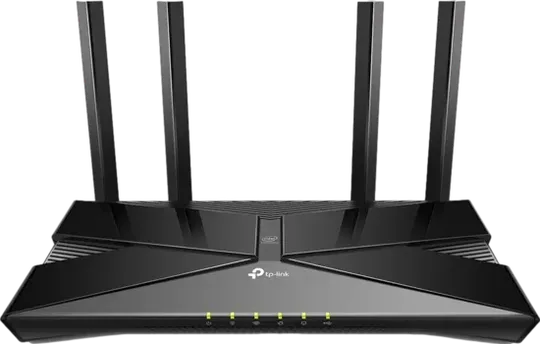
The TP-Link AX3000 is a dual-band Wi-Fi 6 router released in 2022. It reaches 2402 Mb/s, with four external antennas and beamforming that directs the signal toward connected devices.

WPA3 encryption, a firewall with SPI intrusion protection, and URL and port filtering cover the security side, while four LAN and one WAN port handle the gear you connect by cable. Parental controls, QoS and a phone app take care of day-to-day network management.

Overview

Features
Security
Performance
General info
Why TP-Link AX3000 is better than average
  • External antennas
    4
    better than 78%
  • Volume
    1172.8 cm³
    better than 76%
  • Thickness
    45 mm
    better than 84%
  • Release date
    8 Oct 2022
    better than 72%
All specifications

Often compared with

3.9
Compare
To favorites
4.4
Compare
To favorites
3.3
Compare
To favorites
4.4
Compare
To favorites
3.4
Compare
To favorites
3.2
Compare
To favorites
3.5
Compare
To favorites
3.2
Compare
To favorites

General info

Specifications
LAN ports
4
WAN ports
1
Outdoor capability
No
USB ports
0
Release date
8 Oct 2022
Warranty period
1 years
Thickness
45 mm
Width
166 mm
Height
157 mm
External antennas
4
Internal antennas
0
Volume
1172.8 cm³

Performance

Specifications
Wi-Fi version
Wi-Fi 6 (802.11ax), Wi-Fi 5 (802.11ac), Wi-Fi 4 (802.11n)
Wi-Fi bands
Dual-band
Wi-Fi speed
2402 Mb/s
RAM
0.5 GB
External memory slot
No

Security

Specifications
Built-in network firewall
Yes
Wi-Fi security protocols
WPA3
MAC address filtering
Yes
L2TP Passthrough
No
IPsec Passthrough
Yes
SPI intrusion protection
Yes
URL filter
Yes
Network Services Filter
Yes
Port filtering
Yes
Network Address Translation (NAT)
Yes
PPTP server
No
Static IP address
Yes
Parental control
Yes
PPTP Passthrough
Yes
Automatic IP
Yes

Features

Specifications
IPv6 enabled
Yes
Beamforming
Yes
Mesh Wi-Fi
No
MU-MIMO
No
VLAN tagging
Yes
WPS button
Yes
Dedicated smartphone app
Yes
Wireless
Yes
Quality of Service (QoS)
Yes
Dynamic routing
Yes
Network Time Protocol enabled
Yes
Static routing
Yes

Owner reviews

Share your experience with TP-Link AX3000! It takes a couple of minutes and helps others choose.
Reviews (2)
  • Fernando Tijerina
    5/10
    5/10
    • Value for money: 6/10
    • Ease of use: 8/10
    • Performance: 5/10
    • Reliability: 5/10
    • Build quality: 6/10
    It does the job, don't expect magic
    Ten months of daily use in a 95 m² apartment and the summary stays short: it does what the box says, nothing more, nothing less. The 5 GHz at 2402 Mb/s hands me 780-900 Mb/s real at four meters with a wall in between, more than enough for the 500 Mb/s plan, but 2.4 GHz is the weak link and with the microwave on the old devices fall to 40 Mb/s. Four antennas and beamforming do make a difference in the back bedroom, though out on the patio nothing decent arrives anymore, so a long house means mesh or a different router. What surprised me in a good way was the software: parental control, URL filter and VLAN tagging I set up from the app in ten minutes and they've been running for months without me touching them. The long-run downside is the 0.5 GB of RAM, with twenty devices connected the app is slow to open and I've already rebooted it twice this year. Zero USB ports also feels cut down if you wanted to hang a drive or a printer on it, though for what I paid I wasn't expecting miracles.
    Pros
    • Stable 5 GHz at 2402 Mb/s, beamforming that actually helps
    • App with parental control and VLAN that do work
    • Four LAN ports and WPA3 with no fuss
    Cons
    • No USB, so no shared drive or printer
    • 0.5 GB of RAM is tight with plenty of devices
    • 2.4 GHz picks up interference and loses speed
  • Raymond Anderson
    9/10
    9/10
    • Value for money: 9/10
    • Ease of use: 9/10
    • Performance: 9/10
    • Reliability: 9/10
    • Build quality: 8/10
    Wasn't expecting it to hold up this well
    This one took over from an Archer C80 that was dying and kept killing the 5 GHz band every evening, and it just won't act up. Old Vancouver house, three floors: the back bedroom went from 30 Mb/s to around 400 Mb/s on my laptop. WPA3 is on, all the IoT junk sits on 2.4 GHz with no drama, and even the doorbell quit dropping off the network. Got QoS and parental control set up in the app in about five minutes, and I've opened the web UI maybe twice since.
    Pros
    • 5 GHz stays up through two floors and a wall
    • App setup was genuinely quick
    • WPA3 and IPv6 work straight out of the box
    Cons
    • The four LAN ports fill up fast
    • No USB, so no cheap NAS