6.1
Routers

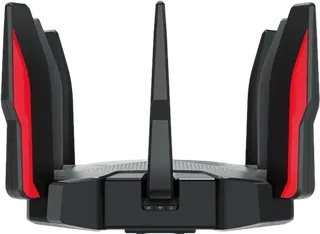
TP-Link Archer AX6000

Write a review
Compare
Connection
  • Dual-band Wi-Fi bands
  • 4804 Mb/s Wi-Fi speed better than 90%
  • WPA3 Wi-Fi security protocols
  • Wi-Fi 6 (802.11ax), Wi-Fi 5 (802.11ac), Wi-Fi 4 (802.11n) Wi-Fi version
Add to comparison

About the model

The TP-Link Archer AX6000 is a dual-band Wi-Fi 6 router released in 2018 for large homes and home offices.

Its radios reach 4804 Mb/s, with eight external antennas, beamforming and MU-MIMO steering signal toward each connected device. Eight LAN ports cover several wired computers or consoles, and 1 GB of RAM keeps things steady with many devices active. WPA3 encryption, a firewall with DoS and SPI protection, URL and port filtering are built in, and mesh support widens coverage with extra units.

Overview

Features
Security
Performance
General info
Why TP-Link Archer AX6000 is better than average
  • Wi-Fi speed
    4804 Mb/s
    better than 90%
  • Total clock speed
    4 × 1.8 GHz
    better than 75%
  • External antennas
    8
    better than 97%
  • RAM
    1 GB
    better than 79%
  • LAN ports
    8
    better than 99%
  • USB ports
    2
    better than 88%
All specifications

TP-Link Archer AX6000 prices

Prices are updated daily and may differ from the shop. We may earn a commission from purchases.

General info

Specifications
LAN ports
8
WAN ports
1
Outdoor capability
No
USB ports
2
Release date
10 Dec 2018
Thickness
261.2 mm
Width
261.2 mm
Height
60.2 mm
External antennas
8
Removable antennas
No
Volume
4107.2 cm³

Performance

Specifications
Wi-Fi version
Wi-Fi 6 (802.11ax), Wi-Fi 5 (802.11ac), Wi-Fi 4 (802.11n)
Wi-Fi bands
Dual-band
Wi-Fi speed
4804 Mb/s
RAM
1 GB
External memory slot
Yes
DNS relay
No
Total clock speed
4 × 1.8 GHz

Security

Specifications
Built-in network firewall
Yes
DoS protection
Yes
Wi-Fi security protocols
WPA3
MAC address filtering
Yes
L2TP Passthrough
Yes
IPsec Passthrough
Yes
SPI intrusion protection
Yes
URL filter
Yes
Network Services Filter
Yes
Port filtering
Yes
Network Address Translation (NAT)
Yes
PPTP server
No
Static IP address
Yes
Parental control
Yes
PPTP Passthrough
Yes
Automatic IP
Yes

Features

Specifications
IPv6 enabled
Yes
Beamforming
Yes
Mesh Wi-Fi
Yes
MU-MIMO
Yes
VLAN tagging
Yes
WPS button
Yes
Wireless
Yes
DLNA certification
No
Universal Plug and Play (UPnP)
Yes
Quality of Service (QoS)
Yes
Dynamic routing
Yes
Inter-VLAN routing
No
Network Time Protocol enabled
Yes
Static routing
Yes

Owner reviews

Rating
5.0
1 rating
  • Value for money
    5
  • Signal strength
    9
  • Security
    6
  • Speeds
    10
  • Ease of use
    9
Share your experience with TP-Link Archer AX6000! It takes a couple of minutes and helps others choose.
Reviews (3)
  • Violeta Heredia
    7/10
    7/10
    • Value for money: 8/10
    • Speeds: 7/10
    • Security: 7/10
    • Ease of use: 8/10
    • Signal strength: 8/10
    Great for streaming, but it runs warm
    Bought it for gaming and for uploading 4K clips to the NAS, and those 4804 Mb/s really show - I push a 3 GB file over Wi-Fi 6 without the game cuting out. I live in a two-floor flat and upstairs the 5 GHz already drops quite a bit even with the 8 antennas, though the 8 LAN ports let me keep the TV, console, PC and NAS wired with no extra switch. The only thing that bugs me is that it gets warm, so I propped it up on a few caps to let it breathe :)
    Pros
    • 8 LAN ports, no extra switch needed
    • NAS uploads don't drop on Wi-Fi 6
    • App setup done in 10 minutes
    Cons
    • Gets warm during long sessions
    • 5 GHz slows down upstairs
  • lukita_s
    4/10
    4/10
    • Value for money: 3/10
    • Speeds: 4/10
    • Security: 6/10
    • Ease of use: 5/10
    • Signal strength: 5/10
    Not for IPv6
    Went with this instead of the GX90 because of the 8 LAN ports and 1 GB of RAM, but IPv6 is still a mess to this day and the 6 GHz band is missing entirely, so yeah, that's where it stands
    Pros
    • Full set of 8 LAN ports
    • 1 GB RAM handles plenty of devices
    Cons
    • IPv6 has issues
    • No 6 GHz band
    • Price isn't justified
  • Andre Oliveira
    5/10
    5/10
    • Value for money: 5/10
    • Speeds: 10/10
    • Security: 6/10
    • Ease of use: 9/10
    • Signal strength: 9/10
    IPv6 is a dead end here
    Good router otherwise. Daily use is fine. Then you switch on IPv6 and it just does nothing. I read a few threads, people have been asking TP-Link to fix this for over two years. Buy it again? NEVER. Need IPv6, get something else.
    Cons
    • No IPv6