Raspberry Pi Zero W
2.7
Single-board computers

Raspberry Pi Zero W

Write a review
Compare
Key specs
  • 0.5 GB RAM better than 26%
  • 1 USB ports better than 11%
  • 1 × 1 GHz Total clock speed better than 8%
Add to comparison

About the model

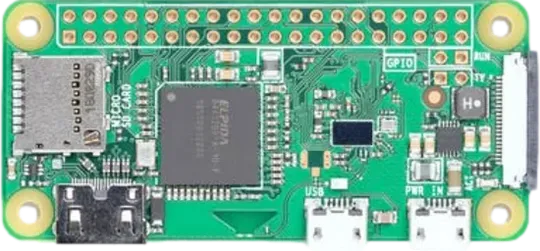
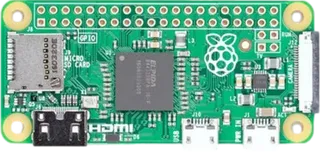
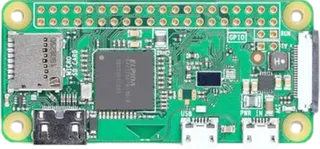
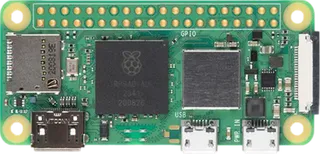
Raspberry Pi Zero W is a single-board computer released in 2017. Its board measures 65 mm by 30 mm at 5 mm thick, and it weighs 9 g.

It has 0.5 GB of RAM, one USB port and a slot for external memory cards. Wi-Fi 4 and Bluetooth 4.1 are built in, so it can join a network without a cable. The HDMI output with integrated graphics drives a display directly.

That makes it a fit for small embedded projects, simple retro gaming setups and light desktop tasks.

Overview

Sensors
Performance
Connectivity
General info
Why Raspberry Pi Zero W is better than average
  • Height
    30 mm
    better than 92%
  • Width
    65 mm
    better than 76%
All specifications

Often compared with

8.2
Compare
To favorites
8.2
Compare
To favorites
6.6
Compare
To favorites
8.1
Compare
To favorites
8.7
Compare
To favorites
6.6
Compare
To favorites
5.5
Compare
To favorites
5.4
Compare
To favorites
7.0
Compare
To favorites
4.5
Compare
To favorites

Raspberry Pi Zero W prices

Prices are updated daily and may differ from the shop. We may earn a commission from purchases.

General info

Specifications
Release date
28 Feb 2017
Weight
9 g
Width
65 mm
Height
30 mm
Thickness
5 mm
Volume
9.75 cm³

Performance

Specifications
Big.LITTLE technology
No
RAM
0.5 GB
External memory slot
Yes
64-bit support
No
Integrated graphics
Yes
ECC memory support
No
Total clock speed
1 × 1 GHz

Connectivity

Specifications
USB ports
1
USB Type-C
No
HDMI output
Yes
Wi-Fi connectivity
Yes
Wi-Fi version
Wi-Fi 4 (802.11n)
Bluetooth version
4.1
Bluetooth
Yes
Ethernet port
No
HDMI ports
1
AUX input
No
Microphone input
No
S/PDIF Out port
No
Has a VGA connector
No

Sensors

Specifications
Infrared sensor
No
Accelerometer
No
Compass
No
Gyroscope
No

Owner reviews

Share your experience with Raspberry Pi Zero W! It takes a couple of minutes and helps others choose.
Reviews (4)
  • Encarna Gascón
    9.5/10
    9.5/10
    • Value for money: 10/10
    • Ease of use: 10/10
    • Performance: 8/10
    • Reliability: 9/10
    • Build quality: 9/10
    Eight months on 24/7 and it's still going
    Eight months now with one in the living room doing audio receiver and sensor gateway duty: 0.5 GB of RAM, 1 USB OTG, Wi-Fi 4 and Bluetooth 4.1, and it runs MPD plus an MQTT broker without even sweting. At 9 g and 65x30x5 mm I taped it behind a piece of furniture and you can't see it at all, yet HDMI still pushes clean 1080p whenever I want to watch something. The only thing that let me down was the microSD, it died at four months, but everything else has been on all day ever since.
    Pros
    • 9 g and 65x30x5 mm, fits anywhere
    • HDMI at 1080p with no issues
    • Bluetooth 4.1 pairs on the first go
    • Absurdly low draw plugged in 24/7
    Cons
    • One microSD died at four months
    • Wi-Fi 4 only on 2.4 GHz
  • Ceylin v.
    3/10
    3/10
    • Value for money: 4/10
    • Ease of use: 3/10
    • Performance: 2/10
    • Reliability: 2/10
    • Build quality: 4/10
    Get rid of this thing
    Four months, every single day. The 2.4GHz radio drops out the momment a wall gets between it and the router, and two microSD cards have already died on me. At that point it stops being bad luck and starts being the design.
    Cons
    • Wi-Fi 4 dies through a single wall
    • microSD slots chew up cards
    • 2.4GHz only, no 5GHz
  • Bradley L.
    10/10
    10/10
    • Value for money: 10/10
    • Ease of use: 10/10
    • Performance: 9/10
    • Reliability: 10/10
    • Build quality: 9/10
    Cheapest thing on my shelf, and the most useful one
    Ordered one on a Friday, Pi-hole was up by Sunday, and two weeks later it's still doing exactly the job I gave it: 65x30x5 mm, 9 g of board, drawing power off the same micro-USB charger as my phone. Setup went in the standard order - flash the card with Raspberry Pi Imager, drop the wpa_supplicant file onto the boot partition - and it was on my Wi-Fi 4 network at first boot. The lone USB port is OTG-only, so a powered hub takes the Ethernet dongle and the keyboard for when I actually want a desktop, and the full-size HDMI output gives a clean 1080p picture on the TV 😀 Bluetooth 4.1 paired with a cheap speaker in seconds for notification sounds :D. Half a gig of RAM means one browser tab at a time, but for headless services it never once ran out
    Pros
    • 9 g, screws straight onto the wall
    • Real HDMI port, so no adapter needed
    • Wi-Fi 4 and BT 4.1 both work right out of the box
    • Cheaper than a takeaway
    Cons
    • 0.5 GB RAM limits multitasking
    • Just one USB port, and it's OTG only
  • Omar
    9/10
    9/10
    • Value for money: 10/10
    • Ease of use: 9/10
    • Performance: 8/10
    • Reliability: 9/10
    • Build quality: 8/10
    Hard to believe for something this size
    Second week with the Zero W and I still can't get my head around 65x30x5 mm and 9 g pushing a VNC remote desktop at 1080p over HDMI with the session never dropping :D The 1 GHz CPU runs out of steam the moment you open two Chromium tabs, that's where you feel it, but for a Python script reading a sensor over I2C and publising over Wi-Fi 4 it's plenty. The USB port is OTG, so if you want a keyboard and a network dongle at the same time you need a hub with its own power supply, there's no way around it. Bluetooth 4.1 I use with a BLE thermometer and it pairs on the first go, no drama, no retries. For what it costs there's nothing more honest for learning Linux and GPIO, though HDMI audio picks up a bit of background noise if you turn the volume up
    Pros
    • Minimal size and weight
    • HDMI straight in, no adapters
    • Full GPIO, properly documented
    • Toy-level price
    Cons
    • Just one USB, and it's OTG
    • 0.5 GB of RAM is tight with a browser
    • Audible hiss in HDMI audio