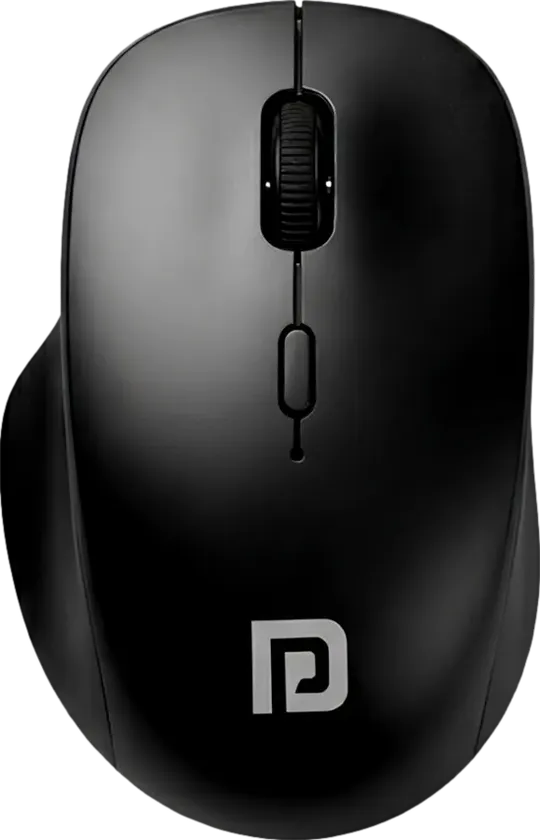
Portronics ToadGo
3.1
Mice

Portronics ToadGo

Write a review
Compare
Key specs
  • 125 Hz Polling rate better than 13%
  • 2.4GHz wireless, Bluetooth Connection type
  • 70 hours Battery life better than 39%
  • 85 g Weight better than 55%
Add to comparison

Overview

Design
Buttons
Performance
General info
Why Portronics ToadGo is better than average
  • Release date
    1 Mar 2026
    better than 97%
All specifications

Often compared with

10.0
Compare
To favorites
9.0
Compare
To favorites
7.6
Compare
To favorites
6.7
Compare
To favorites
7.7
Compare
To favorites
7.5
Compare
To favorites
6.8
Compare
To favorites
6.5
Compare
To favorites
8.5
Compare
To favorites
8.1
Compare
To favorites

Portronics ToadGo prices

Prices are updated daily and may differ from the shop. We may earn a commission from purchases.

Performance

Specifications
Polling rate
125 Hz
Maximum speed
30 IPS
Maximum acceleration
10 G
Maximum DPI
2400 DPI
Minimum DPI
600 DPI
Adjustable DPI
Yes

General info

Specifications
Type
Productivity
Connection type
2.4GHz wireless, Bluetooth
Sensor
Optical Sensor
Onboard memory profiles
0
Gesture support
No
Battery life
70 hours
Use while charging
Yes
Rechargeable battery
Yes
Warranty period
1 years
Release date
1 Mar 2026

Buttons

Specifications
Number of buttons
6
Number of side buttons
2
Number of programmable buttons
6
DPI switching button
Yes
Profile switching button
No

Design

Specifications
Orientation
Right-handed
Weight
85 g
RGB lighting
No
Tilting scroll wheel
No
Thumb scroll wheel
No
Tuning weights included
No
Cable length
1 m
Thickness
45 mm
Height
120 mm
Width
75 mm
Size class
Large

Owner reviews

Share your experience with Portronics ToadGo! It takes a couple of minutes and helps others choose.
Reviews (3)
  • mara
    5/10
    5/10
    • Value for money: 6/10
    • Ease of use: 7/10
    • Performance: 4/10
    • Reliability: 5/10
    • Build quality: 6/10
    The numbers make it clear, and that's the painful bit
    Picked up this Portronics ToadGo for 25 euros in a sale, already knowing it wasn't a gaming mouse, but comparing it with my brother's Basilisk V3 Pro 35K made me think properly about what I actually needed. What sold me was the 70 hours of battery and being able to use it while charging, since my previous AKKO Echo always died halfway through the week and was useless on the cable. In practice the battery figure holds up: at eight hours a day on 2.4 GHz I got to the eighth day with 15% and plugged in the 1 m cable without stopping work.

    The problem is the numbers that matter if you play. 125 Hz polling is half what a 40 euros mouse does now, and you notice it when moving the cursor quickly on a 144 Hz screen. The 2400 DPI max, 10 G acceleration and 30 IPS put it at the level of an office mouse from a few years back, and next to a Naga V3 Pro or an ATK Dragonfly A9 Air it's a whole generation apart. With 0 profiles in onboard memory, switching computers means reinstalling the software and setting up the six programmable buttons again, which is annoying in a hybrid setup.

    On the good side, 85 g and 120x75x45 mm sit well in the right hand, the two side buttons are in the right spot for going back in the browser, and the DPI button on top cycles 600/1200/1800/2400 with no software at all. For Excel, Slack and browsing it works perfectly, and the optical sensor hasn't skipped once in three weeks. A one year warranty is short and there's no info on switch durability, which matters on a 25 euros mouse. If budget is the boss and you don't game, it's reasonable; if you do game, put in 20 more euros and get something else.
    Pros
    • 70 hours of battery confirmed in real use
    • 2.4 GHz and Bluetooth switching with no failures
    • Right-handed comfort for a medium hand
    • Low price for what you get
    Cons
    • 125 Hz polling and 2400 DPI max
    • 0 profiles in onboard memory
    • Only a 1-year warranty
    • 10 G and 30 IPS well below the competition
  • Matthew M.
    9/10
    9/10
    • Value for money: 9/10
    • Ease of use: 10/10
    • Performance: 8/10
    • Reliability: 9/10
    • Build quality: 8/10
    One mouse, two computers, zero cable swapping
    Got this to ditch a wired mouse that snagged on my desk, and the 2.4GHz dongle plus Bluetooth pairing lets me flip between my work laptop and home desktop without unplugging anything all day. The top DPI button is more useful than I figured for a 2400 DPI max, and the 70 hour battery claim actually holds up - I've only charged it twice in about six weeks of eight hour days. My only complaint is 125 Hz polling shows up right away if you try a flick-shot in an FPS, but flick-shots aren't what a productivity mouse is for, so that's fair.
    Pros
    • Switching between connections is effortless
    • Battery claim is true in real use
    • Charges via USB while you keep working
    • Six buttons cover everything I map
    Cons
    • 125 Hz polling, can't change it
    • No onboard profiles, remapping depends on the software
  • Carlos
    10/10
    10/10
    • Value for money: 10/10
    • Ease of use: 10/10
    • Performance: 9/10
    • Reliability: 10/10
    • Build quality: 9/10
    From a battery mouse to this, and you can tell
    I had a battery-powered Logitech M170 and the change shows up in really specific ways: the DPI button lets me jump from 600 to 2400 in one tap when I'm checking photos on the laptop and back to 1200 for Excel, and with Bluetooth I pair the laptop without pulling the receiver out of the desktop PC. The 70-hour battery lasted me almost three weeks of office use, and the best part is I can keep working with the 1 m cable plugged in while it charges... The 85 g and the right-handed shape don't tire my wrist during eight-hour days, though the 125 Hz polling rate falls short if I ever try a shooter
    Pros
    • Instant switching between 2.4 GHz and Bluetooth
    • Works while charging, no pauses
    • Real battery life of almost three weeks
    • Light and comfortable for all-day use
    Cons
    • 125 Hz is no good for fast games
    • The sides feel a bit plasticky