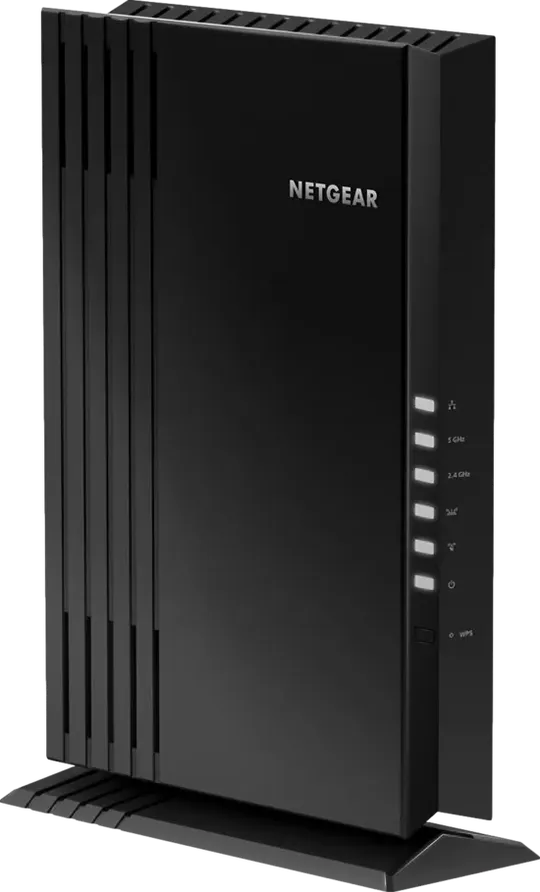
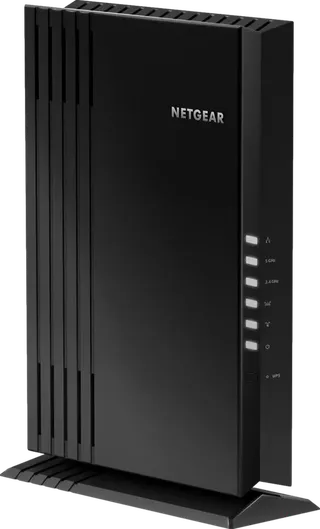
Netgear EAX18
Write a review
Compare
Connection
  • Dual-band Wi-Fi bands
  • Yes Beamforming
  • WPA3, WPA2, WPA, WEP Wi-Fi security protocols
  • Wi-Fi 6 (802.11ax), Wi-Fi 5 (802.11ac), Wi-Fi 4 (802.11n) Wi-Fi version
Add to comparison

About the model

The Netgear EAX18 is a dual-band Wi-Fi extender released in 2022. It works with Wi-Fi 6, Wi-Fi 5 and Wi-Fi 4 networks and reaches combined speeds of up to 1750 Mb/s. Beamforming and MU-MIMO direct the signal toward connected devices, and mesh support lets it share one network name.

Four LAN ports take wired devices, and a WPS button pairs it without a password. Setup runs through a smartphone app. It has no external antennas and draws 12 W.

Overview

Design
Features
General info
Why Netgear EAX18 is better than average
  • LAN ports
    4
    better than 96%
All specifications

Often compared with

9.3
Compare
To favorites
7.2
Compare
To favorites
9.1
Compare
To favorites
8.5
Compare
To favorites
8.5
Compare
To favorites
6.8
Compare
To favorites
6.8
Compare
To favorites
7.6
Compare
To favorites
7.5
Compare
To favorites
8.1
Compare
To favorites

Netgear EAX18 prices

Prices are updated daily and may differ from the shop. We may earn a commission from purchases.

General info

Specifications
Wi-Fi version
Wi-Fi 6 (802.11ax), Wi-Fi 5 (802.11ac), Wi-Fi 4 (802.11n)
Wi-Fi speed
1750 Mb/s
Wi-Fi bands
Dual-band
Release date
4 Apr 2022
Operating power consumption
12 W
LAN ports
4

Features

Specifications
MU-MIMO
Yes
Mesh Wi-Fi
Yes
Beamforming
Yes
Wi-Fi security protocols
WPA3, WPA2, WPA, WEP
Dedicated smartphone app
Yes
WPS button
Yes

Design

Specifications
External antennas
0
Height
241.7 mm
Width
169.5 mm
Thickness
63.4 mm
Volume
2,597.38 cm³

Owner reviews

Share your experience with Netgear EAX18! It takes a couple of minutes and helps others choose.
Reviews (2)
  • Cameron Riley
    3/10
    3/10
    • Value for money: 3/10
    • Ease of use: 7/10
    • Performance: 4/10
    • Reliability: 2/10
    • Build quality: 6/10
    Same dropouts on both units
    Got it at Currys in March for 79 quid. I wanted Wi-Fi 6 in the back bedroom, nothing special. The app had it running in ten minutes. All good. Then two hours later the 5 GHz band was gone. A restart brought it back for ten minutes. Then gone again. 2.4 GHz stayed on the whole time, so the phone kept grabbing that and crawling.

    I returned it the next week. The staff swapped it no problem and gave me a new box. The new one does the same, only less often. Maybe once a day now. It also reboots by itself at times. I know since the LAN light cuts out and my console drops mid-match. That's with three of the four ports occupied.

    When the 5 GHz works, speed is decent. Around 500 Mbps a few metres away on the laptop. Of course it's nowhere near the 1750 on the box. On a drop, the app shows the extender offline and back online a minute later. No error, no log I can read.

    A mate runs the TP-Link RE235BE in a similar flat, same broadband. His has been solid for five months. It was cheaper as well. I should have asked him first.

    There are good bits. Setup is easy. WPS links the printer in seconds. Beamforming does something. The hallway signal is stronger than with my old plug. The build feels light, not flimsy.

    Reliability is the killer. The replacement acts like the broken one. Two units, same fault. Not bad luck, the product. I lost the receipt for the second swap, so I'm stuck with it until I can be bothered to argue again.
    Pros
    • Quick setup, app walks you through it
    • 4 LAN ports
    Cons
    • 5 GHz drops out, even on the second unit
    • Reboots on its own mid-session
    • No useful error in the app when it fails
    • Speed far off the advertised figure
  • Gadget76
    8/10
    8/10
    • Value for money: 7/10
    • Ease of use: 9/10
    • Performance: 8/10
    • Reliability: 8/10
    • Build quality: 8/10
    From RE200 to this one, same plug socket
    I had a TP-Link RE200 that I got in 2018erd, and in the living room it just didn't cut it, kept dropping when someone streamed 4K. With the EAX18, I put it in the same plug socket, same hallway, about six meters from the router with a wall in between. Let me break down what I noticed, because these are different things.

    First, coverage. Before, in the back room I'd lose half the bars and my phone would cling to the router until the connection died. Now there's just one network with the same name, and switching between router and extender is seamless, real mesh, not the manual fiddling I had to do with the RE200.

    Second, speed. With my laptop two meters from the extender on 5 GHz, I got over 600 Mbps download in a Speedtest on a 1 Gbps fiber line. In the back room, around 220 Mbps. The 1750 Mb/s on the box is the sum of both bands, I knew that, but the actual 5 GHz performance lives up to expectations. Wi-Fi 6 makes a difference on my new phone, especially in latency when there are multiple devices connected: with the laptop downloading and the TV streaming at the same time, my video call didn't drop.

    Third, the ports. It has 4 LAN ports, which was my main reason for switching, because the RE200 only had one. I've plugged in the TV, console, and a mini PC, and everything runs on cable without relying on Wi-Fi. No miracles there, what comes in wirelessly is what goes out.

    Fourth, the app. Netgear's app is ugly and takes a while to find the device the first time, but for checking who's connected and turning off guest access, it's fine. WPS worked right away with my printer.

    Fifth, power and heat. With a plug meter, it shows about 12 W, consistent with the specs, and the device gets warm but not hot. It's tall, 24 cm, and blocks the adjacent socket, yeah.

    I compared with the TP-Link RE655BE that a coworker has, and he said it's similar, but it costs quite a bit more, and I don't need those speeds. I paid 89 euros at MediaMarkt during a sale. For an 85 m² apartment with brick walls, it seems pretty reasonable, as long as you don't expect an extender to turn bad fiber into good.
    Pros
    • Real mesh with a single network, the switch is seamless
    • 4 LAN ports, which almost no extender at this price has
    • Stable Wi-Fi 6 with multiple devices at once
    • Low power draw, measured at 12 W
    Cons
    • It's tall and blocks the socket next to it
    • Netgear app is slow to pair the first time
    • The 1750 Mb/s is the sum of bands, not what you'll get on a single one