6.2
Webcams

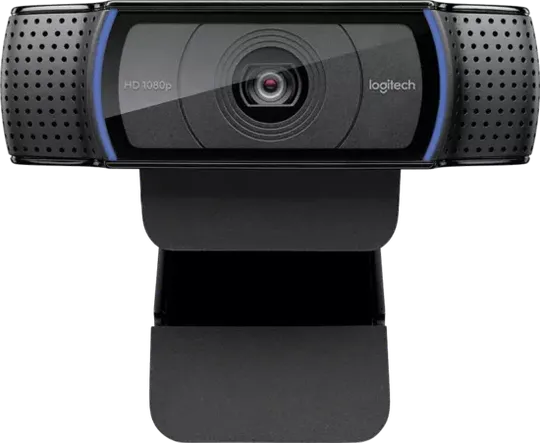
Logitech C920

Write a review
Compare
Imaging
  • Yes Indicator light
  • 78° Field of view better than 35%
  • 1080 × 30 fps Video recording better than 31%
  • 3 MP Megapixels (main camera) better than 28%
Add to comparison

About the model

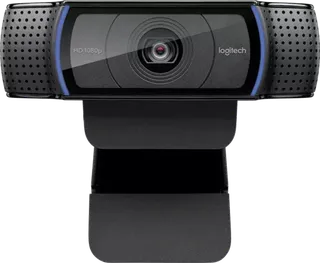
Logitech C920 is a webcam released in 2012, built for video calls, streaming and recording at a desk. Its 78 degree field of view takes in more than a face, so a room fits in the frame. Continuous autofocus holds focus as you move, auto light correction lifts dim scenes, and two noise-canceling stereo microphones carry speech. A privacy shutter covers the lens, and the 1.5 m cable detaches for travel.

Overview

Audio
Design
Optics
Videography
Connectivity & Features
Why Logitech C920 is better than average
  • Height
    43.3 mm
    better than 88%
All specifications

Often compared with

8.0
Compare
To favorites
9.8
Compare
To favorites
10.0
Compare
To favorites
9.3
Compare
To favorites
9.9
Compare
To favorites
8.1
Compare
To favorites
6.4
Compare
To favorites
9.0
Compare
To favorites
9.4
Compare
To favorites
8.0
Compare
To favorites

Logitech C920 prices

Prices are updated daily and may differ from the shop. We may earn a commission from purchases.

Design

Specifications
Privacy shutter
Yes
Indicator light
Yes
Tripod mount
Yes
Video light
No
Motion sensor
No
Warranty period
1 years
Thickness
71 mm
Height
43.3 mm
Weight
162 g
Width
94 mm

Videography

Specifications
Auto light correction
Yes
Continuous autofocus for movies
Yes
Field of view
78°
Adjustable field of view
No
HDR mode
No
Video recording
1080 × 30 fps

Optics

Specifications
Megapixels (main camera)
3 MP
Glass lens
Yes
Damage-resistant glass
No
CMOS sensor
No

Audio

Specifications
Noise-canceling microphone
Yes
Built-in microphone
Yes
Number of microphones
2
Stereo microphone
Yes
Built-in speaker
No

Connectivity & Features

Specifications
Release date
5 Jan 2012
USB Type-C
No
Cable length
1.5 m
Detachable cable
Yes
Compatible with Android
No
Compatible with Chrome OS
Yes
Compatible with iOS
Yes
Compatible with Mac OS X
Yes
HDMI output
No
3.5mm audio jack
No
Is compatible with Windows
Yes

Owner reviews

Share your experience with Logitech C920! It takes a couple of minutes and helps others choose.
Reviews (2)
  • Гостомысл Исаков
    3/10
    3/10
    • Autofocus: 3/10
    • Low-light performance: 2/10
    • Camera: 5/10
    • Build quality: 6/10
    • Video quality: 4/10
    No visible difference from a 900-ruble webcam, imo
    I'd been stuck on an ancient A4Tech, grabbed a C920 hoping for decent Zoom video, and got the same 1080p30 with mush in a room lit by one lamp in the evening. In shadows the autofocus drifts toward infinity and recovers after a couple seconds; the mics drag in fridge hum no better than the old one. Spent 8500, should've bought a separate mic and kept the old camera
    Pros
    • privacy shutter and tripod mount are there
    Cons
    • 1080p30 max
    • autofocus drifts in shadows
    • noise with one lamp
    • paying for the brand
  • maria eduarda_a
    7/10
    7/10
    • Autofocus: 9/10
    • Low-light performance: 5/10
    • Camera: 7/10
    • Build quality: 8/10
    • Video quality: 7/10
    I made a spreadsheet before buying and it turned out to be right
    I spent two weeks comparing before I decided. The Obsbot Tiny 2 has a gimbal and tracking, the Lenovo Go 4K Pro records in 4K, the Obsbot Meet Flip does that mirror thing, and all of them cost three times as much. In the end I needed a camera for work meetings, classes and the occasional stream. The C920 handles that.

    What won me over in the numbers: the 78° field of view fits me sitting with the shelf behind me without looking cramped in the frame. The sensor is 3 MP, it outputs 1080p at 30 fps and that's it. If you want 60 fps for gaming, this isn't the camera, and that's why the site's 46/100 is right - it's 2012 equipment.

    Glass lens, continuous autofocus that doesn't hunt for my face during a call, two noise-cancelling mics that help when the fan is on. The indicator light is genuinely useful and the privacy shutter is the best part of the whole thing; I close it and sleep easy...

    The 1.5 m cable is detachable, there's a tripod thread on the bottom, it's 162 g. The clip on top of my laptop's thin screen wobbles, so I fixed it with a R$30 tabletop tripod.

    What bugs me: Logitech's software for adjusting exposure is a pain, and in low light the noise is pretty visible. With auto correction on and a lamp above, it turned out good enough.

    Seven out of ten, and the three missing points are all down to the old sensor.
    Pros
    • stable 1080p30 without stuttering
    • noise-cancelling mics actually work
    • privacy shutter and tripod thread
    • price far below the gimbal competitors
    Cons
    • only 30 fps, no 60
    • noise in dark rooms
    • limited Logitech software
    • flimsy clip on thin screens
    5 replies
    • Eric Smith
      Reading this from a work-from-home setup where all I need is to not look like a potato on Teams. The bit about the autofocus not hunting is what sold me, my old one breathes in and out through the whole call 😄 Picked one up at Micro Center yesterday, plugged it in, no driver hassle whatsoever, and it worked in Teams and Zoom right away. The clip on a thin lid is as flimsy as you said, so mine sits on a little tripod now. Thanks, this saved me from spending three times as much on an Obsbot.
      • maria eduarda_a
        I partly disagree. The autofocus doesn't constantly refocus when the light is decent, but in low light it does drift in and out, and you'll see it at your first 7 p.m. meeting with the ceiling light on. The "driverless" claim is also half true: Windows recognizes UVC right away, but to adjust exposure, gain, and white balance you need Capture or G Hub, otherwise everything stays on auto 😅 The noise cancellation from the two microphones only really works up to about 30 cm; beyond that it picks up the keyboard. Overall you made the right choice, there's nothing better in this price range.
    • Irene J.
      Mine was bought for calls with my sister in Canada and for the grandkids, nothing fancy. The one thing I'd add: the 1.5 m cable is shorter than you think once the tower is under the desk, I had to get a USB extension the same week. The shutter has been great with two teenagers in the house, they know the red light means business. Mine has been knocked about on a monitor arm for about four years and still works, though the flap on the shutter got loose. Nobody has asked me to switch to a headset yet, so the mics are doing their job.
      • Robert_b
        Appreciate the cable tip - that's exactly the info you don't get on a spec sheet. Ended up with the C920 and ordered a 3 m extension to go with it :) Picking it up Saturday.
      • Robert
        @Robert_b, Same here. The thread settled it for me too. Went C920 over the Lenovo Go 4K Pro: my uplink tops out around 6 Mbps and the client downscales 4K anyway. Heads up - the 3 MP sensor gives 1080p30 max over USB 2.0 in MJPEG. If your capture software negotiates YUY2, you drop to 720p without noticing. Check that before you blame the camera :) Mount is a standard 1/4"-20 thread. Mine went straight onto a cheap desk arm.