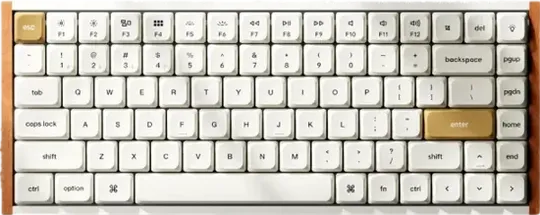
Keychron K3 HE
9.8
Keyboards

Keychron K3 HE

Write a review
Compare
Key specs
  • Compact (75%) Keyboard layout size
  • 1000 Hz Polling rate better than 38%
  • Linear Switch feel
  • 540 g Weight better than 97%
Add to comparison

Overview

Design
Features
Switches
General info
Keys & layout
Why Keychron K3 HE is better than average
  • Actuation distance (min)
    0.1 mm
    better than 89%
  • Weight
    540 g
    better than 97%
  • Width
    306 mm
    better than 95%
  • Release date
    12 Feb 2026
    better than 94%
  • Actuation distance (max)
    4 mm
    better than 94%
  • Actuation force
    35 g
    better than 93%
  • Bluetooth version
    5.3
    better than 91%
  • Thickness
    22 mm
    better than 82%
All specifications

Often compared with

8.7
Compare
To favorites
8.7
Compare
To favorites
8.9
Compare
To favorites
9.7
Compare
To favorites
9.7
Compare
To favorites
8.5
Compare
To favorites
8.9
Compare
To favorites
8.8
Compare
To favorites
9.4
Compare
To favorites
8.9
Compare
To favorites

Keychron K3 HE prices

Prices are updated daily and may differ from the shop. We may earn a commission from purchases.

General info

Specifications
Keyboard type
Standard, Mechanical, Gaming
Keyboard layout size
Compact (75%)
Profile
Low-profile
Connectivity
Wireless & wired
Connection type
2.4GHz wireless, USB, Bluetooth
Polling rate
1000 Hz
Mount type
Plate mount
MacOS layout
Yes
Detachable cable
Yes
Height
116 mm
Width
306 mm
Thickness
22 mm
Weight
540 g
Bluetooth version
5.3
Release date
12 Feb 2026
Warranty period
1 years

Design

Specifications
RGB lighting
Yes
Backlit keyboard
Yes
Case material
Aluminum, Plastic
Plate material
Aluminum
Case colors
White, Black
Adjustable typing angle
Yes
Wrist rest
No
Backlight facing direction
North-facing

Switches

Specifications
Switch type
Hall effect
Switch feel
Linear
Hot-swappable switches
Yes
Actuation distance (min)
0.1 mm
Actuation distance (max)
4 mm
Actuation force
35 g
Total travel distance
3.5 mm
Switch name
Gateron Magnetic Jade Pro

Features

Specifications
Analog input
Yes
Rapid trigger
Yes
Dual actuation
Yes
Adjustable actuation
Yes
NKRO
Yes
USB passthrough
No
Integrated display
No
QMK support
Yes
ZMK support
Yes
VIA support
Yes

Keys & layout

Specifications
Keyboard layout
ANSI (United States)
Keycap type
Double-shot, PBT
Keycap profile
LSA
Standard key layout
Yes
Media keys
Dedicated media keys
Rotary dial
No

Owner reviews

Share your experience with Keychron K3 HE! It takes a couple of minutes and helps others choose.
Reviews (3)
  • Hilda G.
    8/10
    8/10
    • Value for money: 7/10
    • Ease of use: 8/10
    • Performance: 8/10
    • Reliability: 8/10
    • Build quality: 8/10
    Still here after five months of daily use
    I've had the K3 HE in the office since March, eight hours a day Monday to Friday, and overall it's better than I expected when I bought it. I came from a cheap membrane keyboard and the difference shows most in the noise, my coworkers don't give me dirty looks on video calls anymore :) The 22 mm low profile saved my wrist, I stopped using a wrist rest after about a week. The 35 g linear switches are so light that at first I typed extra letters, took a few days to get used to, and now I won't go back to anything heavier. What did let me down is the battery on 2.4 GHz, with RGB on it lasts about four workdays, so I ended up leaving it plugged in almost all the time, and for that I might as well have skipped the wireless part. The aluminum case is still solid, no wobble or loose keys after five months, though the base is plastic and already has nail marks near the edge. The software for adjusting rapid trigger does its job, but the interface looks like it's ten years old. The 75% layout with arrow keys is enough for Excel, I don't miss the number pad. For what I paid, I'd buy it again.
    Pros
    • 22 mm low profile, comfortable wrist
    • 35 g linear switches are very smooth for typing all day
    • Aluminum case has no wobble or case noise after months
    • 75% layout with arrows doesn't take up half the desk
    Cons
    • Short battery life with RGB on at 2.4 GHz
    • Software has an outdated interface
    • Plastic base gets marked by nails
  • Емельян Абрамов
    2/10
    2/10
    • Value for money: 2/10
    • Ease of use: 5/10
    • Performance: 3/10
    • Reliability: 2/10
    • Build quality: 5/10
    Not what the numbers promised
    Took this instead of the NuPhy WH80 because of the 0.1 mm and 1000 Hz. Within a month the 2.4 GHz dropped out twice, and rapid trigger fired on its own.
    Pros
    • Typing feels nice, 35 g doesn't wear you out
    Cons
    • 2.4 GHz dropouts
    • rapid trigger misfires
    • Warranty is only a year
    • Pricier than rivals with the same sensor
  • Michelle K.
    9/10
    9/10
    • Value for money: 8/10
    • Ease of use: 8/10
    • Performance: 9/10
    • Reliability: 9/10
    • Build quality: 9/10
    The 1000 Hz and 0.1 mm combo is the reason
    I picked the K3 HE over the Azoth 96 HE and NuPhy WH80 because neither ships 1000 Hz polling with 0.1 mm minimum actuation in a 75% low-profile shell. The 35 g hall-effect linears and 0.15 mm rapid trigger make counter-strafing in CS2 feel like cheating 😍 The 540 g aluminum plate has zero flex or ping, the north-facing RGB keeps keycap legends clear, and dual actuation lets me keep a 0.6 mm typing profile alongside a deep 3.5 mm gaming one without opening software mid-session, which the Falcata still does not handle as cleanly. After four months of daily abuse, the 1 year warranty has not been touched once, and that is the highest compliment I can give this board.
    Pros
    • 1000 Hz polling with no dropouts over 2.4 GHz
    • 0.1 mm actuation and rapid trigger that actually reads
    • aluminum plate with no flex and no ping
    • dual actuation profiles without rebooting anything
    Cons
    • Bluetooth 5.3 pairing takes a few seconds
    • wish the RGB were brighter in daylight