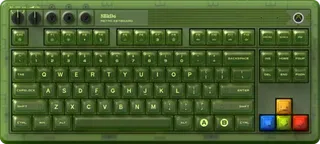
Keychron K2 QMK Wireless
4.7
Keyboards

Keychron K2 QMK Wireless

Write a review
Compare
Key specs
  • Compact (75%) Keyboard layout size
  • 1000 Hz Polling rate better than 38%
  • Linear Switch feel
  • 813 g Weight better than 82%
Add to comparison

About the model

The Keychron K2 QMK Wireless is a compact 75% mechanical keyboard released in 2024, with a plastic and aluminum case.

Its linear switches actuate after 2 mm of travel and sit in hot-swappable sockets, so they can be swapped without soldering. A 1000 Hz polling rate reports each press quickly, Bluetooth 5.2 and USB-C cover wireless and wired use, and the battery lasts up to 190 hours. The body weighs 813 g.

It suits gaming and everyday desk work, and the typing angle can be adjusted.

Overview

Design
Features
Switches
General info
Keys & layout
Why Keychron K2 QMK Wireless is better than average
  • Bluetooth version
    5.2
    better than 91%
  • Weight
    813 g
    better than 82%
  • Width
    311.1 mm
    better than 79%
  • Height
    121.1 mm
    better than 73%
All specifications

Keychron K2 QMK Wireless prices

Prices are updated daily and may differ from the shop. We may earn a commission from purchases.

General info

Specifications
Keyboard type
Mechanical, Gaming
Keyboard layout size
Compact (75%)
Profile
Standard
Connectivity
Wireless & wired
Connection type
USB, Bluetooth
Polling rate
1000 Hz
Mount type
Plate mount
Battery life
190 hours
MacOS layout
Yes
Detachable cable
Yes
Height
121.1 mm
Width
311.1 mm
Thickness
41.01 mm
Weight
813 g
Bluetooth version
5.2
Release date
29 Jan 2024
Warranty period
1 years

Design

Specifications
RGB lighting
Yes
Backlit keyboard
Yes
Case material
Aluminum, Plastic
Plate material
Aluminum
Case colors
Black
Adjustable typing angle
Yes
Wrist rest
No
Backlight facing direction
North-facing

Switches

Specifications
Switch type
Mechanical
Switch feel
Linear
Hot-swappable switches
Yes
Actuation distance (min)
2 mm
Actuation distance (max)
2 mm
Actuation force
45 g
Total travel distance
4 mm
Switch name
Keychron Super Mechanical

Features

Specifications
Analog input
No
Rapid trigger
No
Dual actuation
No
Adjustable actuation
No
NKRO
Yes
USB passthrough
No
Integrated display
No
QMK support
Yes
ZMK support
No
VIA support
No

Keys & layout

Specifications
Keyboard layout
ANSI (United States)
Keycap type
Double-shot, Shine-through, PBT
Keycap profile
Cherry
Standard key layout
Yes
Media keys
Via Fn key
Rotary dial
No

Owner reviews

Share your experience with Keychron K2 QMK Wireless! It takes a couple of minutes and helps others choose.
Reviews (1)
  • 欢 林.
    9/10
    9/10
    • Value for money: 9/10
    • Ease of use: 9/10
    • Performance: 9/10
    • Reliability: 9/10
    • Build quality: 8/10
    Switched from that office membrane board, typing feels like a different person
    Before this I was on the membrane keyboard the office hands out, and after a full day of typing my wrists ached. Last year on Double 11 I finally bit the bullet and got this K2 QMK wireless, and by the first week I didn't want to touch the old one. The 75% layout is just right for someone like me who needs arrow keys but has a small desk, all the function keys are there, and a big chunk of desk opened up. The linear switch at 45g presses easy, 2mm to actuate and 4mm to bottom out, and after three hours straight of writing code my fingers weren't tired. At night with the lights off I turn the RGB on, the north-facing LEDs with the stock height keycaps don't catch on anything!! Bluetooth 5.2 links to my desktop and laptop and I hop back and forth, the delay in CS2 is basically unnoticeable, and that 1000Hz polling rate is definately not just talk. The battery is listed at 190 hours, I run the backlight at the lowest brightness and charge it maybe once a week or a bit longer, thriftier than I expected. There are downsides. At 813g it's a lot of weight, so taking it to the office takes some thinking, and the case is plastic with aluminum, the corners don't feel as solid as a full aluminum one.
    Pros
    • 75% layout keeps the arrow keys and saves a good bit of desk space
    • QMK lets you remap keys and flash firmware yourself, no driver install
    • Hot-swap means changing switches without soldering, cheap to try switches out
    • Switching between Bluetooth devices is pretty quick
    Cons
    • 813g is on the heavy side, awkward to carry on the commute
    • Plastic plus aluminum build, the corners don't feel great