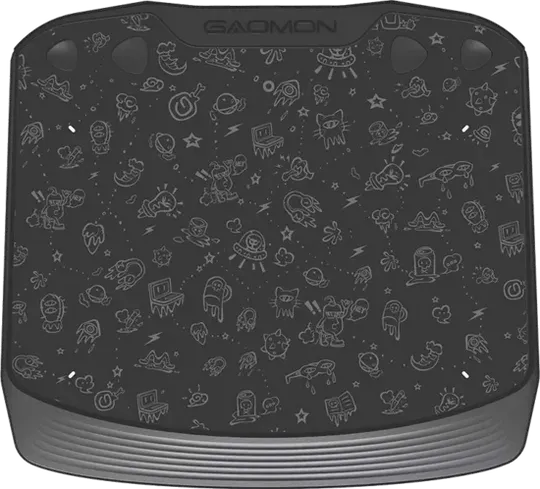
Gaomon S830
Write a review
Compare
Key specs
  • Pen tablet Type
  • 4 Number of tablet buttons better than 35%
  • 172.3 × 107.7 mm² Active drawing area better than 11%
  • 346 g Weight better than 70%
Add to comparison

About the model

The Gaomon S830 is a pen tablet released in 2022. You draw on its surface and the strokes appear on a connected computer's screen.

The pen reads 8192 pressure levels and responds to tilt, so line weight and shading follow your pressure and pen angle. A 266 RPS report rate and 5080 LPI resolution keep the cursor steady.

Four tablet buttons and two pen buttons can be set to shortcuts. It weighs 346 g, is 7.5 mm thick, has a detachable cable and works with Windows, macOS and Chromebook.

Overview

Pen
Connectivity
General info
Why Gaomon S830 is better than average
  • Weight
    346 g
    better than 70%
  • Width
    235 mm
    better than 89%
  • Thickness
    7.5 mm
    better than 81%
  • USB 2.0 ports
    1
    better than 78%
  • Release date
    21 Jan 2022
    better than 74%
All specifications

Often compared with

5.3
Compare
To favorites
4.7
Compare
To favorites
3.5
Compare
To favorites
4.4
Compare
To favorites
6.8
Compare
To favorites
6.6
Compare
To favorites
5.3
Compare
To favorites
6.8
Compare
To favorites
5.3
Compare
To favorites
5.9
Compare
To favorites

Gaomon S830 prices

Prices are updated daily and may differ from the shop. We may earn a commission from purchases.

General info

Specifications
Type
Pen tablet
Compatibility
Mac, Windows, Chromebook
Integrated display
No
Number of tablet buttons
4
Wireless
No
Release date
21 Jan 2022
3.5mm audio jack
No
Fold-out legs
No
Pen stand
No
Detachable cable
Yes
Weight
346 g
Width
235 mm
Thickness
7.5 mm
Height
215 mm
Travel bag included
No
Number of microphones
0
Active drawing area
172.3 × 107.7 mm²
Volume
378.9 cm³
Stylus included
Yes

Pen

Specifications
Pen pressure levels
8192
Pen resolution
5080 LPI
Report rate
266 RPS
Pen tilt sensitivity
Yes
Number of pen buttons
2
Pen weight
12 g
Pen tilt degrees
60°

Connectivity

Specifications
HDMI ports
0
DisplayPort outputs
0
Bluetooth
No
USB 3.2 Gen 2 ports (USB-C)
0
USB 3.2 Gen 1 ports (USB-C)
0
USB 3.2 Gen 1 ports (USB-A)
0
USB 2.0 ports
1
Usb 3 2 gen2 a ports
0

Owner reviews

Share your experience with Gaomon S830! It takes a couple of minutes and helps others choose.
Reviews (2)
  • Víctor T.
    5/10
    5/10
    • Value for money: 5/10
    • Ease of use: 7/10
    • Performance: 6/10
    • Reliability: 5/10
    • Build quality: 6/10
    Does the job, that's it
    Four buttons, 8192 pressure levels and 266 RPS look fine on paper. Retouching photos in darktable feels about the same as a five-year-old tablet tbh. The cable comes loose if I move the desk.
    Pros
    • 346 g and 7.5 mm, doesn't get in the way on the desk
    • Detachable cable for storing it
    Cons
    • Only 4 buttons, no extra shortcut access
    • Just one USB 2.0 port, no USB-C
    • The cable connector loosens with use
  • Miloslava S.
    7/10
    7/10
    • Value for money: 8/10
    • Ease of use: 7/10
    • Performance: 8/10
    • Reliability: 6/10
    • Build quality: 7/10
    Light and quiet, but the buttons are loud
    I got it at the end of January, mainly for photo editing and a little Krita. At 346 g and 7.5 mm thick it fits in my laptop bag. That decided it. The pen weighs 12 g, and after two hours my hand doesn't hurt. The 8192 pressure levels are right; the line in Krita flows smoothly. Tilt works and shading comes out soft. The 5080 LPI shows on slow strokes, no stair-stepping. 266 RPS, no lag even with a fast flick. It's a big jump from my old tablet. Four buttons are enough for me: undo, zoom and eraser. They do click loudly, though; at night it's audible through the wall. The cable detaches, good for travel. But when the tablet gets moved on the desk, the connector loosens and the pen stops responding, so I have to push it in. The Windows 11 driver didn't load the first time; after a restart it did, and in Photoshop I had to switch to WinTab. That annoyed me for two hours. A friend has an older Huion H420X: small for my notes, but fine for sketches and cheaper. I tried a Chromebook and it ran without installation. For the money I'd buy it again. It's a good choice for photos and study. For serious illustration I'd want more buttons.
    Pros
    • 346 g and 7.5 mm, travels with the laptop
    • Tilt and 8192 pressure levels work in Krita and Photoshop
    • 5080 LPI, smooth line even on a slow stroke
    • Price against the competition
    Cons
    • The buttons are loud
    • The cable connector loosens when the tablet moves
    • The driver needed a restart and a manual switch to WinTab
    • Only one USB 2.0 port, no USB-C

More in Smartphones & tablets