7.1
3D printers

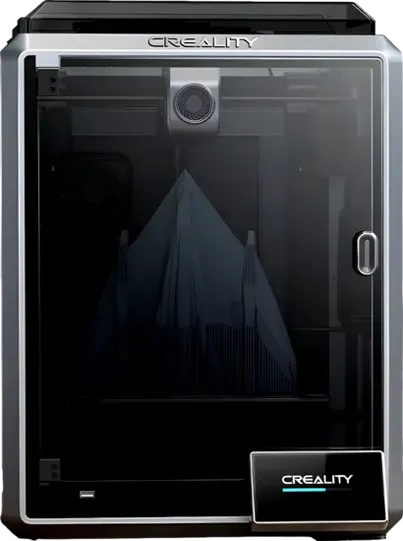
Creality K1

Write a review
Compare
Key specs
  • 600 mm/s 3D print speed better than 88%
  • 100 µm Layer thickness better than 33%
  • 220 × 220 × 250mm Max creation size better than 59%
  • 12,500 g Weight better than 56%
Add to comparison

About the model

The Creality K1 is a fused deposition modeling (FDM) 3D printer released in 2023. It prints at up to 600 mm/s and builds layers of 100 µm, so a model comes off the plate quickly while surface detail stays tight. The 0.4 mm nozzle takes 1.75 mm filament in PLA, PET and ABS.

Bed levelling runs automatically before each job, and power loss recovery resumes printing after an interruption. Wi-Fi and app control let you start and monitor jobs remotely.

Overview

Features
Materials
Components
Print sizes
Connectivity
General info
Why Creality K1 is better than average
  • Thickness
    355 mm
    better than 79%
  • Width
    355 mm
    better than 77%
  • 3D print speed
    600 mm/s
    better than 88%
All specifications

Often compared with

9.4
Compare
To favorites
8.5
Compare
To favorites
7.8
Compare
To favorites
7.2
Compare
To favorites
7.7
Compare
To favorites
6.5
Compare
To favorites
7.6
Compare
To favorites
8.4
Compare
To favorites
6.7
Compare
To favorites
7.2
Compare
To favorites

General info

Specifications
File formats
AMF, OBJ, STL
Weight
12,500 g
Fused deposition modeling (FDM) technology
Yes
Stereolithography (SLA) technology
No
Selective laser sintering (SLS) technology
No
Release date
1 Apr 2023
Height
480 mm
Width
355 mm
Thickness
355 mm
Maximum operating temperature
30 °C
Lowest potential operating temperature
10 °C
Volume
60,492 cm³

Components

Specifications
Auto-generated support structures
No
Heated build platform
Yes
1.75mm filament diameter
Yes
Nozzle size
0.4 mm
3D print speed
600 mm/s
Number of extruder heads
1

Materials

Specifications
PET printing
Yes
Printing in PLA
Yes
Printing in ABS plastic
Yes

Print sizes

Specifications
Layer thickness
100 µm
Max creation size
220 × 220 × 250mm

Connectivity

Specifications
App control
Yes
External memory slot
No
USB ports
1
RJ45 ports
0
Wi-Fi connectivity
Yes

Features

Specifications
Integrated display
Yes
Screen size
4.3"
Touch screen
Yes
Bed levelling
Automatic bed leveling
Power loss recovery
Yes
Pre-assembled
No
Operating power consumption
350 W

Owner reviews

Share your experience with Creality K1! It takes a couple of minutes and helps others choose.
Reviews (2)
  • Pierre B.
    4/10
    4/10
    • Value for money: 3/10
    • Ease of use: 4/10
    • Performance: 5/10
    • Reliability: 4/10
    • Build quality: 5/10
    Two weeks in, the verdict is lukewarm
    Two weeks, about thirty prints, and the order of things is simple. Assembly is a fifteen-minute job, four screws, auto bed leveling does its thing and I haven't touched the settings once, that much is settled. The 600 mm/s on the spec sheet, though, is pure showroom: on PLA with the 0.4 nozzle and 100 µm layers, I get 250 to 300 mm/s in volumetric flow before the walls start going dull, and you have to bump the temp 5 to 10 °C to make up for it. The noise is what bugs me most, past forty minutes the fans are audible from the hallway with the door shut. The 4.3-inch touchscreen is responsive and the app kicks off an STL from the couch without trouble, but the Wi-Fi drops out now and then and there's no RJ45 at all, just one USB for a stick, which is stingy. ABS goes through, provided you accept warping on big parts since the machine is open, I lost two 15 cm plates. Accuracy is fine, 0.1 mm on a calibration cube, and power-loss recovery worked one time out of two. Next to it, a Bambu Lab A1 at the same price prints just as well with a much more readable slicer, and a Kobra 2 Plus gives you more volume for the same budget. It's not a bad machine, it's a machine at market price with a spec sheet above reality, and I'm staying with my 4 out of 10.
    Pros
    • Quick to assemble
    • Auto leveling with no surprises
    • Decent dimensional accuracy
    Cons
    • 600 mm/s rarely reachable
    • Loud
    • No RJ45, only one USB
    • ABS with no enclosure
  • Raymond Rémy
    7.5/10
    7.5/10
    • Value for money: 7/10
    • Ease of use: 7/10
    • Performance: 8/10
    • Reliability: 7/10
    • Build quality: 8/10
    The plate hasn't moved in eight months of printing
    After eight months of near daily printing, mostly PLA, a bit of ABS and PETG, the machine still keeps its 600 mm/s on simple parts, but I've come back down to around 300 mm/s volumetric speed on complex shapes, otherwise the top surfaces get messy. The heated bed and auto leveling aged the best; I've never had to seriously touch them. The fans aged the worst, they got noisy around month four, plus the original 0.4 nozzle that I eventually replaced. Nothing dramatic for 350 W under the desk and 12.5 kg that you set down and forget, but expect a small tinkering evening every two months if you're printing ABS on tall parts.
    Pros
    • Auto leveling stays reliable over time
    • Real speed on simple geometry
    • Handy 4.3-inch touchscreen
    Cons
    • Fans get noisy after a few months
    • Stock nozzle needs replacing
    • ABS limited without an enclosure
    1 reply
    • Amanda Warner
      That fan noise you ran into in month four is exactly why I started looking at other machines. I had a Bambu A1 for three weeks and returned it, though its slicer was genuinely easier to live with than Creality Print. My K1 went the opposite way: the bed stays level without me touching it, and 600 mm/s is real on simple geometry. Once the part gets tall, though, I drop to roughly 300 mm/s volumetric like you, because the top surfaces start looking rough. ABS was the surprise: I expected a disaster on an open frame, and with a cardboard box over the top I got usable small brackets. Not that anyone should brag about it as a setup, though. How are your fans now - did you swap them for something quieter, or just live with the noise?