6.1
Keyboards

Attack Shark X85

Write a review
Compare
Key specs
  • Compact (75%) Keyboard layout size
  • 1000 Hz Polling rate better than 38%
  • Linear Switch feel
  • 900 g Weight better than 55%
Add to comparison

About the model

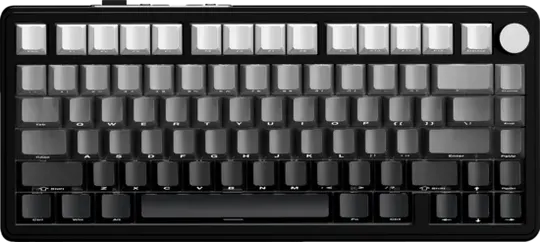
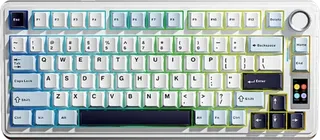
The Attack Shark X85 is a wireless mechanical gaming keyboard released in 2024 with a compact 75 percent layout.

It runs a 1000 Hz polling rate over 2.4 GHz, works over Bluetooth 5.1 or USB, and its battery is rated for 75 hours. Linear switches with a 2 mm minimum actuation distance give quick presses, and hot-swappable sockets let you change them without soldering. A south-facing RGB backlight, aluminium plate and adjustable typing angle suit desk gaming and travel setups.

Overview

Design
Features
Switches
General info
Keys & layout
Why Attack Shark X85 is better than average
  • Actuation force
    42 g
    better than 73%
  • Total travel distance
    3.5 mm
    better than 73%
All specifications

Often compared with

8.5
Compare
To favorites
8.2
Compare
To favorites
7.5
Compare
To favorites
8.6
Compare
To favorites
8.5
Compare
To favorites
7.8
Compare
To favorites
8.5
Compare
To favorites
6.5
Compare
To favorites
6.2
Compare
To favorites
4.2
Compare
To favorites

General info

Specifications
Keyboard type
Standard, Mechanical, Gaming
Keyboard layout size
Compact (75%)
Profile
Standard
Connectivity
Wireless & wired
Connection type
2.4GHz wireless, USB, Bluetooth
Polling rate
1000 Hz
Mount type
Gasket mount
Battery life
75 hours
MacOS layout
Yes
Detachable cable
Yes
Height
185 mm
Width
355 mm
Thickness
55 mm
Weight
900 g
Bluetooth version
5.1
Release date
31 Mar 2024
Warranty period
1 years

Design

Specifications
RGB lighting
Yes
Backlit keyboard
Yes
Case material
Aluminum, Plastic
Plate material
Aluminum
Case colors
Pink, White, Black
Adjustable typing angle
Yes
Wrist rest
No
Backlight facing direction
South-facing

Switches

Specifications
Switch type
Mechanical
Switch feel
Linear
Hot-swappable switches
Yes
Actuation distance (min)
2 mm
Actuation distance (max)
2 mm
Actuation force
42 g
Total travel distance
3.5 mm
Switch name
White Jade Switch

Features

Specifications
Analog input
No
Rapid trigger
No
Dual actuation
No
Adjustable actuation
No
NKRO
Yes
USB passthrough
No
Integrated display
No
QMK support
No
ZMK support
No
VIA support
No

Keys & layout

Specifications
Keyboard layout
ANSI (United States)
Keycap type
Double-shot, PBT
Keycap profile
Cherry
Standard key layout
Yes
Media keys
Via Fn key
Rotary dial
Yes

Owner reviews

Rating
10.0
1 rating
  • Build quality
    10
  • Value for money
    10
  • Gaming
    10
  • Software
    10
  • Features
    10
Share your experience with Attack Shark X85! It takes a couple of minutes and helps others choose.
Reviews (3)
  • Adam R.
    9.5/10
    9.5/10
    • Value for money: 10/10
    • Gaming: 9/10
    • Features: 10/10
    • Software: 6/10
    • Build quality: 8/10
    Came from a 60% Redragon, every measurable thing got better
    Picked up the black one at the end of April, and it showed up in nine days. My old board was a Redragon Fizz K617 60: wired only, plastic plate, brown switches. So this was a real jump, not a sidegrade.

    Wireless side: 2.4 GHz dongle, 1000 Hz polling, and I ran a click test for ten minutes straight. The interval graph holds at 1 ms with a couple of outliers near 2 ms 😄 Same as wired mode on the same board. Bluetooth 5.1 is for typing on the laptop, never for games, the latency is there and you feel it on flicks.

    Switches are linear, 42 g, 2 mm actuation, 3.5 mm total travel. Getting used to no tactile bump took two evenings. After that my typing rate went up and my miss rate went down, since there's no bump to push through before the key fires. Actuation and reset hit the same point, so double taps on strafing feel cleaner than on the browns.

    Sound: aluminium plate in a plastic case isn't a fancy custom build, but with stock caps it's a low clack and there's no ping on spacebar or enter. My old board pinged on enter and that bugged me for a year.

    Hot-swap does what it says. I pulled four switches, put in 5-pin ones with heavier springs, they sat flush with no wobble.

    Battery: charged Sunday night, backlight around 30 percent brightness, 2.4 GHz all week, and I got about 60 to 65 hours before the low battery LED. Take 75 h as a best case with the lights near off.

    Layout is the real upgrade: F row, arrows, and a proper delete key. That delete key is the whole reason I stopped using a 60 percent in the terminal.

    Two gripes tbh. The remap software is ugly and the profile switcher is buried two menus deep. And at 900 g with a 355 mm body this isn't something you carry to a lan night, it's a brick

    For the price, an aluminium plate, south-facing RGB and 2.4 GHz at a thousand hertz together is not something I found anywhere else at this price
    Pros
    • 1 ms intervals steady on the dongle, same as wired
    • 75% layout with arrows and an actual delete key
    • Hot-swap handles 5-pin switches, they sit flush
    • 60+ hours at 30% backlight, believable enough
    Cons
    • Remap software feels clunky
    • 900 g is a lot to lug around
    • Only linear, no tactile version
    1 reply
    • gadget1989
      The flat 1 ms chart doesn't tell the whole story. Dongle next to a USB 3.0 port and I get the odd 8-10 ms spike. Battery barely hits 40 hours at 50% on the light. 75 hours is a fairy tale. 42 g spring and 2 mm actuation is too touchy for typing. Pulled it to 2.4 mm in the software, now I'm comfortable.
  • Moritz Bechtler
    10/10
    10/10
    • Value for money: 10/10
    • Gaming: 10/10
    • Features: 10/10
    • Software: 10/10
    • Build quality: 10/10
    Best keyboard I've EVER had
    Battery life is massive for a wireless board. The rest is bang on too.
  • Jordan Howard
    3/10
    3/10
    • Value for money: 4/10
    • Gaming: 6/10
    • Features: 5/10
    • Software: 2/10
    • Build quality: 4/10
    Two months in, typing is the letdown
    Got the black one in May and use it 8 hours a day at a desk job, plus an hour or two of games at night, so this is not a review from someone who barely uses it. I kept it because of the 75% layout. The arrows are still there, there is no numpad hogging desk space, and the mouse finally has room. That part is fine. The typing feel is the problem. 42 g and 2 mm actuation mean I barely touch a key and it fires. I had two weeks of typos before my hands adjusted, and even now I have to double-check every other word when I write fast. Great for games, AWFUL for a spreadsheet. Software is a joke 😂. Three installs, two froze at the firmware step, and the macro profiles wiped themselves after a restart twice. Support answered in English once, badly, then sent a PDF I cannot read. Double letters. My 'e' key registers twice maybe three times an hour. Hot-swap saved me: I pulled a switch from the far right and put it in, and it kept doing it. So it is the socket, not the switch. Nothing I can fix with a tool. Battery is nothing like 75 hours for me. Backlight on low, 2.4 GHz, I get around 40. RGB off and Bluetooth, closer to 60. Fine for a week of evenings, not fine for the number on the box. Weight is honest at 900 g, it does not slide, and the aluminium plate gives a decent low clack. But press the top right corner of the case and it creaks. Plastic and aluminium together, and you hear where they meet. Angle adjustment is two little feet and nothing else. No wrist rest in the box. And the RGB is south-facing, so from where you sit your keycaps look dark brown instead of lit. Why do that. I am still not returning it. 1000 Hz on the dongle held up through a USB hub, no drops in two months of daily use, and the price was low enough that the gamble was mine. If you mostly game, buy it. If you type for a living, test one first
    Pros
    • 75% layout keeps the arrows and skips the numpad
    • 900 g and it stays put
    • 1000 Hz wireless and no drops in 2 months for me
    Cons
    • Keys register twice, socket issue
    • Software freezes, profiles disappear
    • Battery far off 75 h
    • South-facing RGB leaves keycaps looking unlit