5.9
Keyboards

Attack Shark K86

Write a review
Compare
Key specs
  • Compact (75%) Keyboard layout size
  • 1000 Hz Polling rate better than 38%
  • Linear Switch feel
  • 785 g Weight better than 82%
Add to comparison

About the model

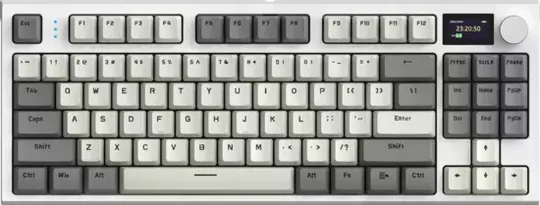
The Attack Shark K86 is a compact 75% mechanical gaming keyboard released in 2024. Its linear switches actuate at 1.7 mm, so presses register early for quick repeated taps, and a 1000 Hz polling rate reports each keystroke every millisecond.

It connects over 2.4 GHz wireless, Bluetooth 5 or a detachable USB cable and runs up to 200 hours per charge. Hot-swap sockets take a different switch set without soldering, and south-facing RGB lighting spreads evenly under the keys.

Overview

Design
Features
Switches
General info
Keys & layout
Why Attack Shark K86 is better than average
  • Weight
    785 g
    better than 82%
  • Total travel distance
    3.5 mm
    better than 73%
All specifications

Often compared with

8.5
Compare
To favorites
8.2
Compare
To favorites
8.6
Compare
To favorites
8.5
Compare
To favorites
7.8
Compare
To favorites
6.5
Compare
To favorites
6.2
Compare
To favorites
6.0
Compare
To favorites
5.0
Compare
To favorites
4.1
Compare
To favorites

General info

Specifications
Keyboard type
Standard, Mechanical, Gaming
Keyboard layout size
Compact (75%)
Profile
Standard
Connectivity
Wireless & wired
Connection type
2.4GHz wireless, USB, Bluetooth
Polling rate
1000 Hz
Mount type
Gasket mount
Battery life
200 hours
MacOS layout
Yes
Detachable cable
Yes
Height
140 mm
Width
360 mm
Thickness
45 mm
Weight
785 g
Bluetooth version
5
Release date
18 Jul 2024
Warranty period
1 years

Design

Specifications
RGB lighting
Yes
Backlit keyboard
Yes
Case material
Plastic
Plate material
Polycarbonate
Case colors
White, Black
Adjustable typing angle
Yes
Wrist rest
No
Backlight facing direction
South-facing

Switches

Specifications
Switch type
Mechanical
Switch feel
Linear
Hot-swappable switches
Yes
Actuation distance (min)
1.7 mm
Actuation distance (max)
1.7 mm
Actuation force
46 g
Total travel distance
3.5 mm
Switch name
Blue Whale Switch

Features

Specifications
Analog input
No
Rapid trigger
No
Dual actuation
No
Adjustable actuation
No
NKRO
Yes
USB passthrough
No
Integrated display
No
QMK support
No
ZMK support
No
VIA support
No

Keys & layout

Specifications
Keyboard layout
ANSI (United States)
Keycap type
Double-shot, PBT
Keycap profile
OEM
Standard key layout
Yes
Media keys
Via Fn key
Rotary dial
Yes

Owner reviews

Share your experience with Attack Shark K86! It takes a couple of minutes and helps others choose.
Reviews (1)
  • Lila M.
    8/10
    8/10
    • Value for money: 9/10
    • Ease of use: 8/10
    • Performance: 8/10
    • Reliability: 7/10
    • Build quality: 7/10
    Gets the job done, a few small gripes
    The 46 g linears are light and quiet enough for a shared room, and with fixed 1.7 mm actuation the feel stays consistent every day. Adjustable travel isn't here, which is the one thing magnetic boards like the AULA Win60 HE can do and this can't. I bought it to replace a big full size board on my work desk, and the 75 percent layout gave me back a lot of space. At 785 grams it stays on the desk and never travels. Battery has been the nice surprise: roughly every three weeks I charge it on the 2.4 GHz dongle with the light off. Once RGB comes on it's nowhere near the 200 hours, but still plenty. The laptop on Bluetooth and the desktop on the dongle, with one key combo to switch, is something I use daily. Spacebar stabilisers rattle a bit. The plastic case flexes if I press hard near the right edge. Driver software refused to install on my Windows 11 office laptop, so I just set everything from the onboard shortcuts. South facing RGB lights the legends cleanly, and the hot swap sockets mean I can drop in different switches next year. That's why I'm keeping it despite the small stuff
    Pros
    • Light 46 g linears, quiet for office use
    • One key combo switches between dongle and Bluetooth
    • Weeks of battery on 2.4 GHz with RGB off
    • Hot swap sockets for changing switches later
    Cons
    • Spacebar stabilisers rattle
    • Plastic case flexes near the right edge
    • Software wouldn't install on my laptop