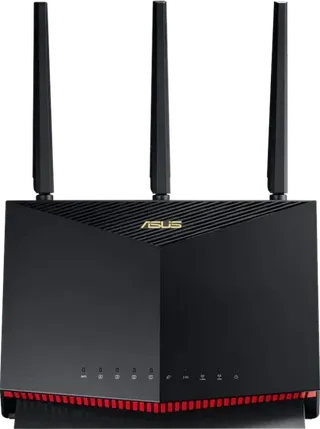
Asus RT-AX56U
5.3
Routers

Asus RT-AX56U

Write a review
Compare
Connection
  • Dual-band Wi-Fi bands
  • 1201 Mb/s Wi-Fi speed better than 42%
  • WPA3 Wi-Fi security protocols
  • Wi-Fi 6 (802.11ax), Wi-Fi 5 (802.11ac), Wi-Fi 4 (802.11n) Wi-Fi version
Add to comparison

About the model

The Asus RT-AX56U is a dual-band Wi-Fi 6 router released in 2020. Its wireless link reaches 1201 Mb/s, and two external antennas with beamforming concentrate the signal toward connected devices.

Four LAN ports and one WAN port serve wired equipment. WPA3 encryption, a built-in firewall, DoS protection and URL filtering cover the security side, while 256 MB of RAM handles routing and connected clients. Mesh support lets the unit extend across a larger home.

Overview

Features
Security
Performance
General info
Why Asus RT-AX56U is better than average
  • Volume
    1372.7 cm³
    better than 76%
  • Thickness
    47.5 mm
    better than 84%
All specifications

Often compared with

5.4
Compare
To favorites
4.9
Compare
To favorites
4.8
Compare
To favorites
6.2
Compare
To favorites
3.9
Compare
To favorites
4.4
Compare
To favorites
4.2
Compare
To favorites
4.1
Compare
To favorites
3.3
Compare
To favorites
4.4
Compare
To favorites

General info

Specifications
LAN ports
4
WAN ports
1
Outdoor capability
No
USB ports
1
Release date
12 Jan 2020
Weight
456 g
Thickness
47.5 mm
Width
223.5 mm
Height
129.3 mm
External antennas
2
Volume
1372.7 cm³

Performance

Specifications
Wi-Fi version
Wi-Fi 6 (802.11ax), Wi-Fi 5 (802.11ac), Wi-Fi 4 (802.11n)
Wi-Fi bands
Dual-band
Wi-Fi speed
1201 Mb/s
RAM
0.26 GB
External memory slot
No
DNS relay
Yes
Internal storage
0.26 GB
Total clock speed
4 × 1.5 GHz

Security

Specifications
Built-in network firewall
Yes
DoS protection
Yes
Wi-Fi security protocols
WPA3
MAC address filtering
Yes
L2TP Passthrough
Yes
IPsec Passthrough
Yes
SPI intrusion protection
No
URL filter
Yes
Network Services Filter
Yes
Port filtering
Yes
Network Address Translation (NAT)
Yes
PPTP server
Yes
Static IP address
Yes
Parental control
Yes
PPTP Passthrough
Yes
Automatic IP
Yes

Features

Specifications
IPv6 enabled
Yes
Beamforming
Yes
Mesh Wi-Fi
Yes
MU-MIMO
Yes
VLAN tagging
No
WPS button
Yes
Dedicated smartphone app
Yes
Wireless
Yes
Quality of Service (QoS)
Yes
Dynamic routing
Yes
Network Time Protocol enabled
Yes
Static routing
Yes

Owner reviews

Share your experience with Asus RT-AX56U! It takes a couple of minutes and helps others choose.
Reviews (2)
  • Nilo Feliu
    9/10
    9/10
    • Value for money: 10/10
    • Ease of use: 9/10
    • Performance: 8/10
    • Reliability: 8/10
    • Build quality: 8/10
    What I need, for the price of an ordinary router
    Under 80 euros and I get 1201 Mb/s, Wi-Fi 6, WPA3, MU-MIMO and beamforming. The thing pushes my 600 Mb symmetric over cable. About 700-800 Mb over Wi-Fi one meter from the router. For an 80 m2 flat that is plently. The cuts show though. 256 MB of RAM is not enough for VPN, a shared disk and twenty clients fighting at once. With USB busy the 2.4 GHz starts complaning. Next to the AX20 or AX10 from TP-Link you pay for Asus firmware and for Merlin support, not for the pretty box
    Pros
    • Price to specs hard to match
    • Asus firmware with Merlin behind it
    • 600 Mb symmetric over cable without a hitch
    Cons
    • 256 MB of RAM leaves little room for extras
    • USB drags the 2.4 GHz down
  • Bianca R.
    5/10
    5/10
    • Value for money: 5/10
    • Ease of use: 7/10
    • Performance: 5/10
    • Reliability: 5/10
    • Build quality: 6/10
    Does the job, but the spec sheet had me expecting more
    Before paying I put the AX56U specs on a sheet next to the Archer AX20 and the AX10, and it won on the points that mattered to me: Wi-Fi 6, WPA3, MU-MIMO, beamforming and 1201 Mb/s for less money than the TP-Link units with less memory. 256 MB of RAM looked tight in the shop and it still does at home; with two TVs streaming and about twenty devices it holds up fine, but the admin panel crawls when I go in to move the QoS around :D. Of the four LAN ports I use two, the USB came in handy for sharing an old drive, and the URL filter plus parental control keep my kids off certain pages without any drama. Coverage reaches the whole apartment, though don't expect miracles from two antennas and concrete walls. What annoys me is the Asus app pushing subscription services and the firmware asking for a reboot every two or three updates. It's still in the living room because it works, not because I'm excited about it
    Pros
    • Wi-Fi 6 and WPA3 for less than several rivals
    • Parental control and URL filtering that actually do their job
    • QoS and MU-MIMO that are useful with lots of devices
    Cons
    • 256 MB of RAM, the panel gets sluggish
    • Two antennas, coverage is only just enough
    • The app keeps pushing paid services